Access Guide

  • Create an application to obtain the Appkey.
  • Integrate the SDK.
  • Configure SDK information.
  • Start the SDK to use the customer service capability.
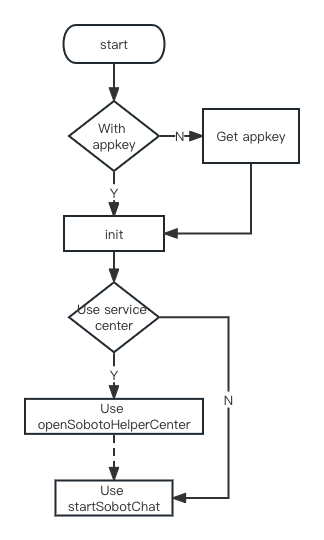
Image

Resource Package Description

The SDK includes (SobotKit.framework, SobotCommon.framework, SobotChatClient.framework, and SobotKit.bundle), SobotDemo, and Doc-related documentation.
File NameDescriptionNotes
SobotKit.frameworkSobot SDK UI Code Library
SobotCommon.frameworkSobot SDK Basic Component Library
SobotChatClient.frameworkCore business code library of ZhiChi SDK
SobotKit.bundleSDK resource library, including image files, multilingual files, and colors
ZCSobotApi.hThis file provides access functions
ZCLibInitInfo.hBasic function parameter class (user information, reception mode, skill group, etc.)
ZCKitInfo.hBasic UI parameter class (color, control visibility, etc.)
ZCUIBaseControllerParent class for UI interface, all other pages inherit from this controller
ZCChatControllerChat Interface
SobotLocalizable.stringsInternational language file, automatically matches based on system language by default
ZCLibClient.hGlobal configuration class, mainly includes non-UI related operation settings

Integration Method

Manual Integration

Download link: iOS_SDK_V1 Unzip [iOS_SDK], and add the necessary files SobotKit.framework, SobotChatClient.framework, SobotCommon.framework, and SobotKit.bundle to your project. The implementation of the ZhiChi iOS_SDK relies on some system frameworks. When developing an application, these frameworks need to be added to the project. First, the developer should click the project name on the right side of the project. Then, on the right side of the project name, select TARGETS -> Build Phases -> Link Binary With Libraries. After expanding Link Binary With Libraries, click the + below to add the following dependencies:
  • AVFoundation.framework
  • AssetsLibrary.framework
  • AudioToolbox.framework
  • SystemConfiguration.framework
  • MobileCoreServices.framework
  • WebKit.framework

CocoPods Integration

Add the following to your Podfile:
// Basic:
pod 'SobotKit'
// E-commerce:
pod 'SobotPlatform'
If the latest version cannot be found, please run the following command to update the CocoPods repository
pod repo update --verbose
If you cannot update to the latest version, delete the index file and try again.
rm ~/Library/Caches/CocoaPods/search_index.json

Clear pod cache:
Delete the pod folder in the code,
pod cache clean SobotChatClient
Run pod install again

Quick Start

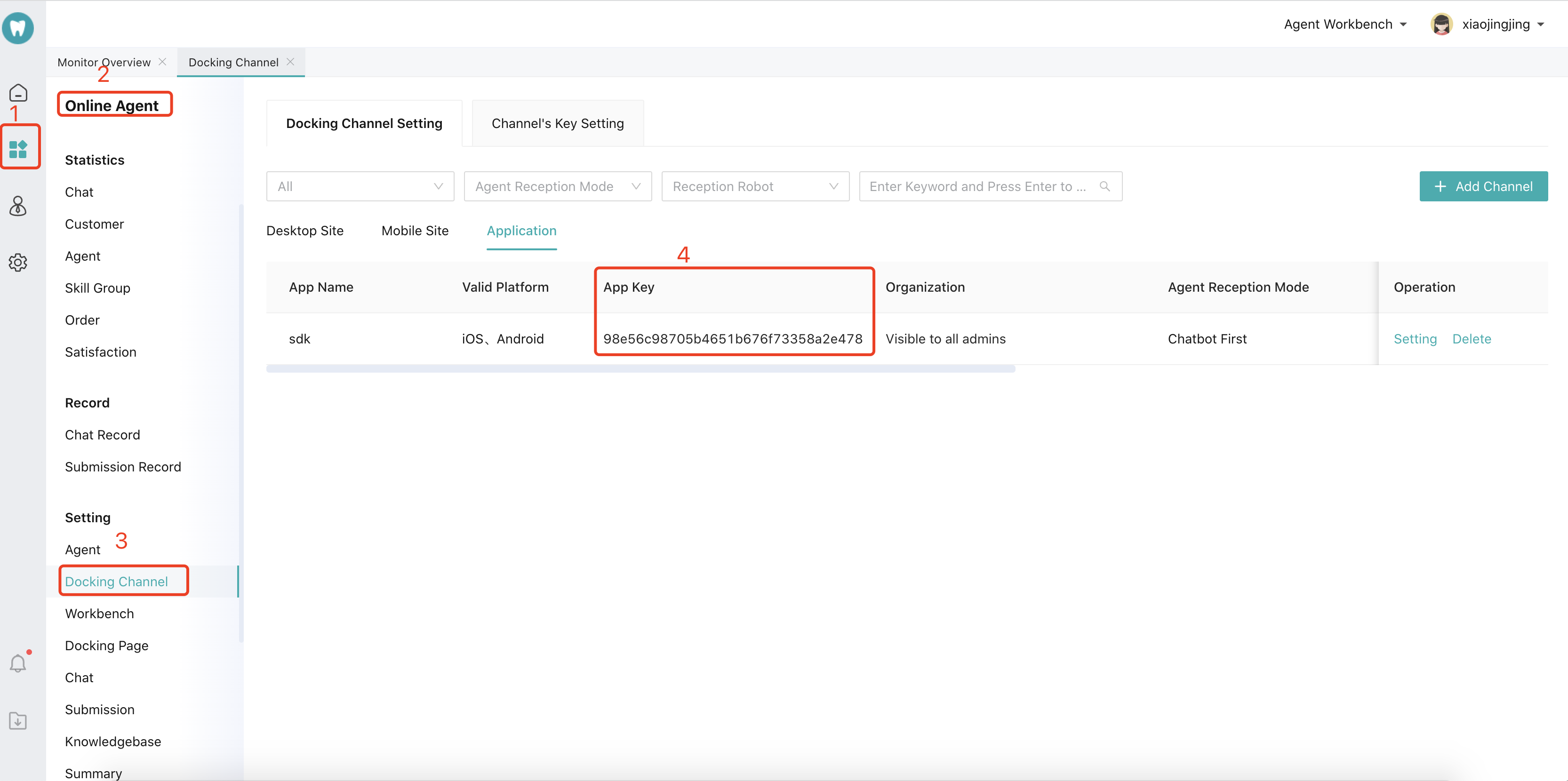
Get app_key

Log in to the Sobot Technology Management Platform to get the appkey, as shown in the picture. Image
Initialize SDK

Initialize the SDK, configure the domain name and appkey. Domain Name Description:
  • The default SaaS platform domain name is: https://api.sobot.com.
  • If you are a Tencent Cloud service, set it to: https://www.soboten.com.
  • For other cases, please refer to the correct configuration of the domain name for obtaining the appkey.
[Note: Before starting the ZhiChi SDK, you must call the initialization interface initSobotSDK. Otherwise, the SDK will fail to start.] Example code:

// Initialization sets the domain name. If not set, the default SaaS domain name is used.
[ZCSobotApi initSobotSDK:@"your appkey" host:@"" result:(void (^)(id object))resultBlock;

Parameter:
Parameter NameTypeDescription
appkeyNSStringapp_key is required. You can view it in the backend under Settings -> APP.
hostNSStringCan be empty. Default is the Alibaba Cloud domain. If using another domain, you need to specify it yourself.
resultBlockNSStringInitialization status callback
Example code:
#import <SobotKit/SobotKit.h>
- (BOOL)application:(UIApplication *)application didFinishLaunchingWithOptions:(NSDictionary *)launchOptions {   
      // Override point for customization after application launch.
    NSLog(@"%@",[ZCSobotApi getVersion]);
    // Error log collection (optional)
    // [ZCSobotApi setZCLibUncaughtExceptionHandler];
    // Optional parameter settings
    if([ZCLibClient getZCLibClient].libInitInfo == nil){
        [ZCLibClient getZCLibClient].libInitInfo = [ZCLibInitInfo new];
    }
    
    // Initialization is required and must be executed before entering the SDK.
    [ZCSobotApi initSobotSDK:@"your app_key" result:^(id  _Nonnull object) {
NSLog(@"Initialization completed %@", object);
    }];
    return YES;
}

Launch Customer Inquiry Page

Customize the UI style and use ZhiChi for customer inquiries. Example code:


/// Launch the chat page, simple processing
/// @param info Custom UI properties
/// @param byController  The page that starts
/// @param pageClick Current state of the page
+ (void)openZCChat:(ZCKitInfo *) info
            with:(UIViewController *) byController
       pageBlock:(void (^)(id object,ZCPageStateType type))pageClick;
    
 
/// Click the link to intercept Help Center, messages, chat, and message history
/// @param messagelinkBlock Get the link. If YES is returned, then intercept it.
+(void)setMessageLinkClick:(BOOL (^)(ZCLinkClickType type,NSString *linkUrl,id _Nullable object))messagelinkBlock;
    
    
Parameter
Parameter NameTypeDescription
infoZCKitInfoCustom settings for initialization parameters
byControllerUIViewControllerThe vc that performs the jump
pageClickvoid (^)(id object,ZCPageBlockType type)Callback when returning a click
Example code:
// Set required parameters. The parameters in ZCLibInitInfo will automatically create this object after initialization.
ZCLibInitInfo *initInfo = [ZCLibClient getZCLibClient].libInitInfo;
// Set the user ID, which is the unique identifier for users. (Do not use fixed values like 123456, 0, or 000000, as chat records with the same ID will be identical). If not set, a unique identifier will be generated based on the device certificate by default. The maximum supported length is 300 characters, and any excess will be automatically truncated.
initInfo.partnerid = @"";

// Reassign
[ZCLibClient getZCLibClient].libInitInfo = initInfo;

// Configure UI
ZCKitInfo *uiInfo=[ZCKitInfo new];
// Such as setting the navigation bar color
uiInfo.topViewBgColor = [UIColor redColor];
[ZCSobotApi openZCChat:uiInfo with:vc pageBlock:^(id  _Nonnull object, ZCPageStateType type) {

}];


// Listen for link click events. If the response is YES, automatically intercept the link.
    [ZCSobotApi setMessageLinkClick:^BOOL(ZCLinkClickType type, NSString * _Nonnull linkUrl, id  _Nullable object) {
NSLog(@"Listen link: %@", linkUrl);
        if ([linkUrl containsString:@"sobot://sendOrderMsg"]) {
            [ZCSobotApi sendOrderGoodsInfo:[ZCUICore getUICore].kitInfo.orderGoodsInfo resultBlock:^(NSString * _Nonnull msg, int code) {
                
            }];
            return YES;
        }
        if ([linkUrl containsString:@"sobot://sendLocation"]) {
                // Send location information
            [ZCSobotApi sendLocation:@{
                @"lat":@"40.001693",
                @"lng":@"116.353276",
@"localLabel":@"No. 38 Xueqing Road, Haidian District, Beijing, Jinma Building",
@"localName":@"Cloud View Seasons Restaurant",
                @"file":@""} resultBlock:^(NSString * _Nonnull msg, int code) {
                
            }];
            return YES;
        }
        if([linkUrl containsString:@"sobot://sendFile"]){
            [ZCSobotApi sendMessageToUser:@"file:///Users/zhangxinyao/Library/Developer/CoreSimulator/Devices/BBB98C5A-0DEB-4FBD-8EB9-8B03ACAFD49A/data/Containers/Data/Application/E2528DA6-28F5-4D1D-BCD0-C4888546C7F6/tmp/com.sobot.sdk.demo-Inbox/ces.txt" type:4 resultBlock:^(NSString * _Nonnull text, int code) {
                
            }];
            return YES;
        }
        
//        if ([linkUrl hasPrefix:@"www."]) {  // Test debugging, use to jump to root vc
//            TestViewController *test = [[TestViewController alloc]init];
//            UIViewController *vc = [self.class getCurrentViewController];
//            [vc presentViewController:test animated:YES completion:nil];
//            test.dismiss = ^{
//                NSLog(@"xx");
//            };
//            return YES;
//        }
        return NO;
    }];
    

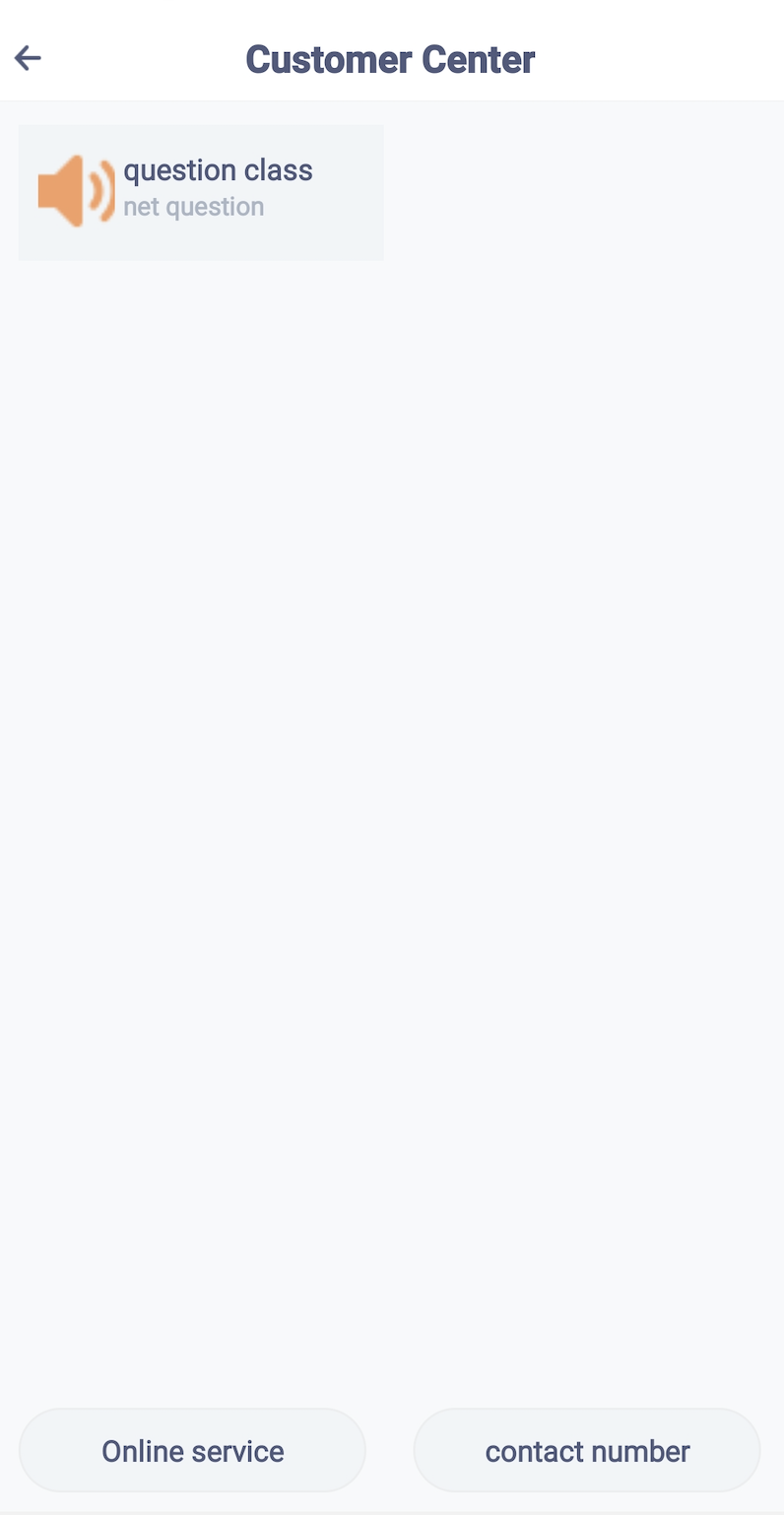
Start Customer Service Center

Optional. If not configured, you can skip it. Example code:
ZCKitInfo *kitInfo = [ZCKitInfo new];
//kitInfo.helpCenterTel = @"40012345678";
//kitInfo.helpCenterTelTitle = @"400-Customer Service";

// Open the help center page
+ (void)openZCServiceCenter:(ZCKitInfo *) info
                         with:(UIViewController *) byController
                  onItemClick:(void (^)(SobotClientBaseController *object))itemClickBlock;
    
Effect as shown in the figure: Image

Permission Settings

If sending voice, images, videos, etc., the following permissions are required. The system will automatically judge internally. Not adding them does not affect the use of other functions.
<key>NSCameraUsageDescription</key>
<string>Sending images requires access to the camera</string>
  // Optional, add it according to your own situation.
<key>NSLocalizedDescription</key>
<string>Use push service</string>
<key>NSMicrophoneUsageDescription</key>
<string>Sending voice requires access to the microphone</string>
<key>NSPhotoLibraryUsageDescription</key>
<string>Sending pictures requires access to the album</string>

Advanced Features

Customer Service Configuration

1. Configure Robot Voice

Based on the needs of your own business, you can configure the following initialization parameters to control the access mode:
ZCKitInfo *uiInfo=[ZCKitInfo new];
// Whether to enable voice function. Enabled by default.
  kitInfo.isOpenRecord = YES;
// Whether to enable robot voice, (paid, otherwise the voice cannot be recognized)
  kitInfo.isOpenRobotVoice = YES;

2. Custom Transfer to Human Agent Event

Customize the manual transfer callback event to intercept the SDK’s manual transfer event. Use it to redirect to your application page for dynamically handling the manual transfer function, and configure parameters such as skill group ID/product information. [Note: If this method is implemented, the SDK’s transfer-to-human event will be handed over to external control. You can jump to a custom skill group page or switch product information, etc. The SDK will no longer perform the transfer-to-human operation. You need to call the transfer-to-human API turnServiceWithGroupId: to implement the specific transfer-to-human operation.]]
@property (nonatomic,strong)  TurnServiceBlock    turnServiceBlock;
Example code:
[ZCLibClient getZCLibClient].turnServiceBlock = ^(SobotChatMessage * _Nullable model, NSInteger turnType) {
	[ZCSobotApi connectCustomerService:model KitInfo:uiInfo ZCTurnType:turnType];
};
       

3. Connect to the designated skill group

Get the skill group ID in the background: Image Configure the skill group ID in the SDK code:
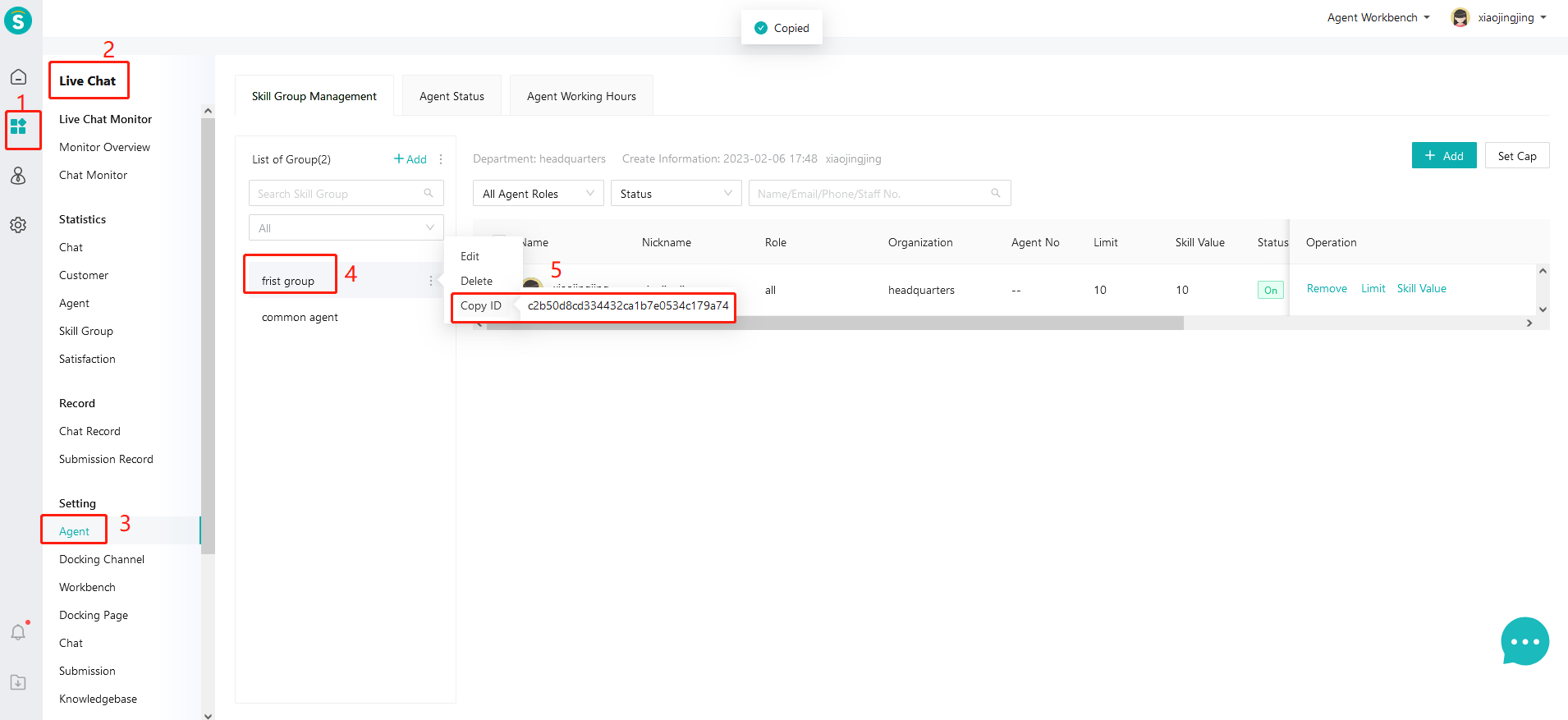
[Note: This field is optional. If a skill group ID is provided, the SDK will skip the skill group selection dialog when transferring to manual service and directly route to the specified skill group.]
ZCLibInitInfo *initInfo = [ZCLibClient getZCLibClient].libInitInfo;
InitInfo.groupid = @"Skill Group ID";

4. Connect to the designated customer service representative

Get the specified customer service ID in the background: Image Image Set in the SDK code:
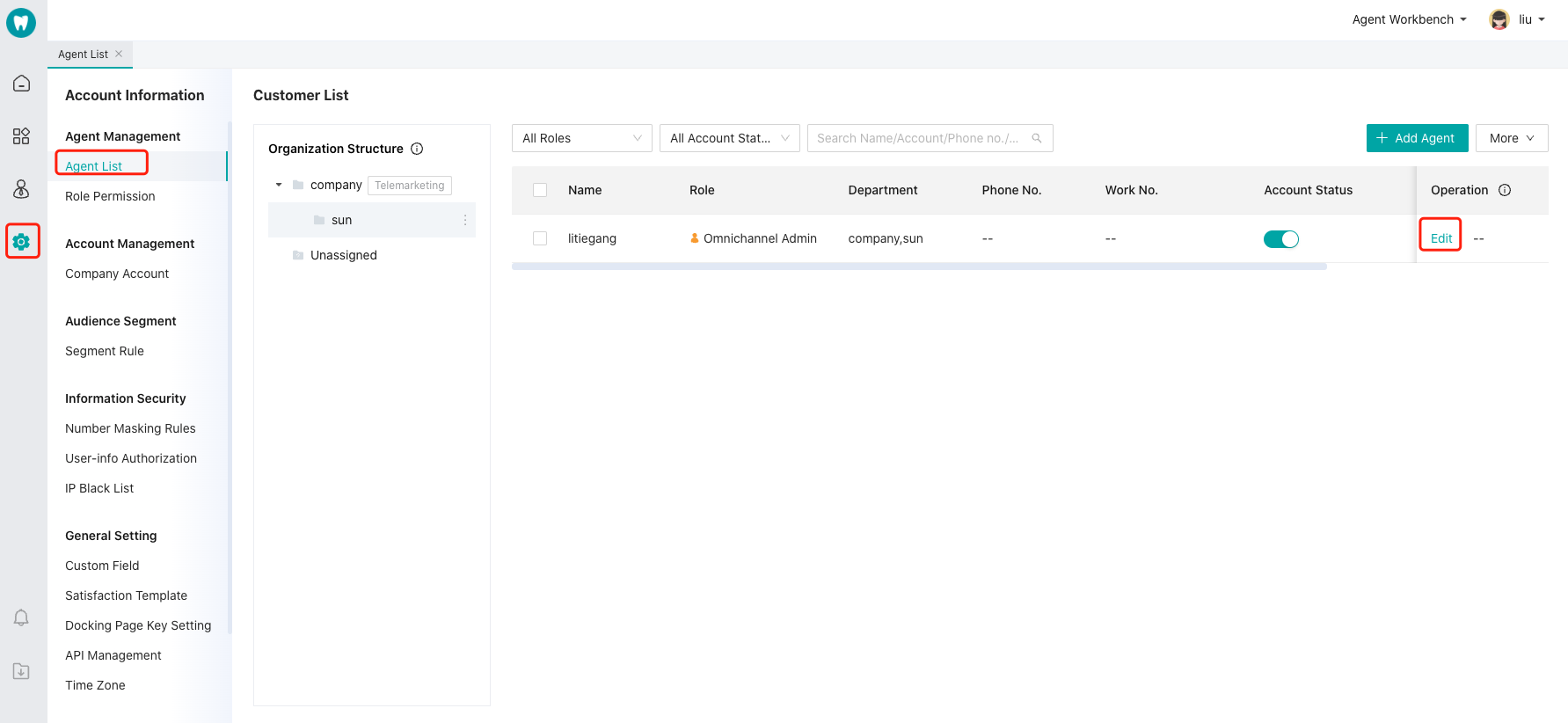
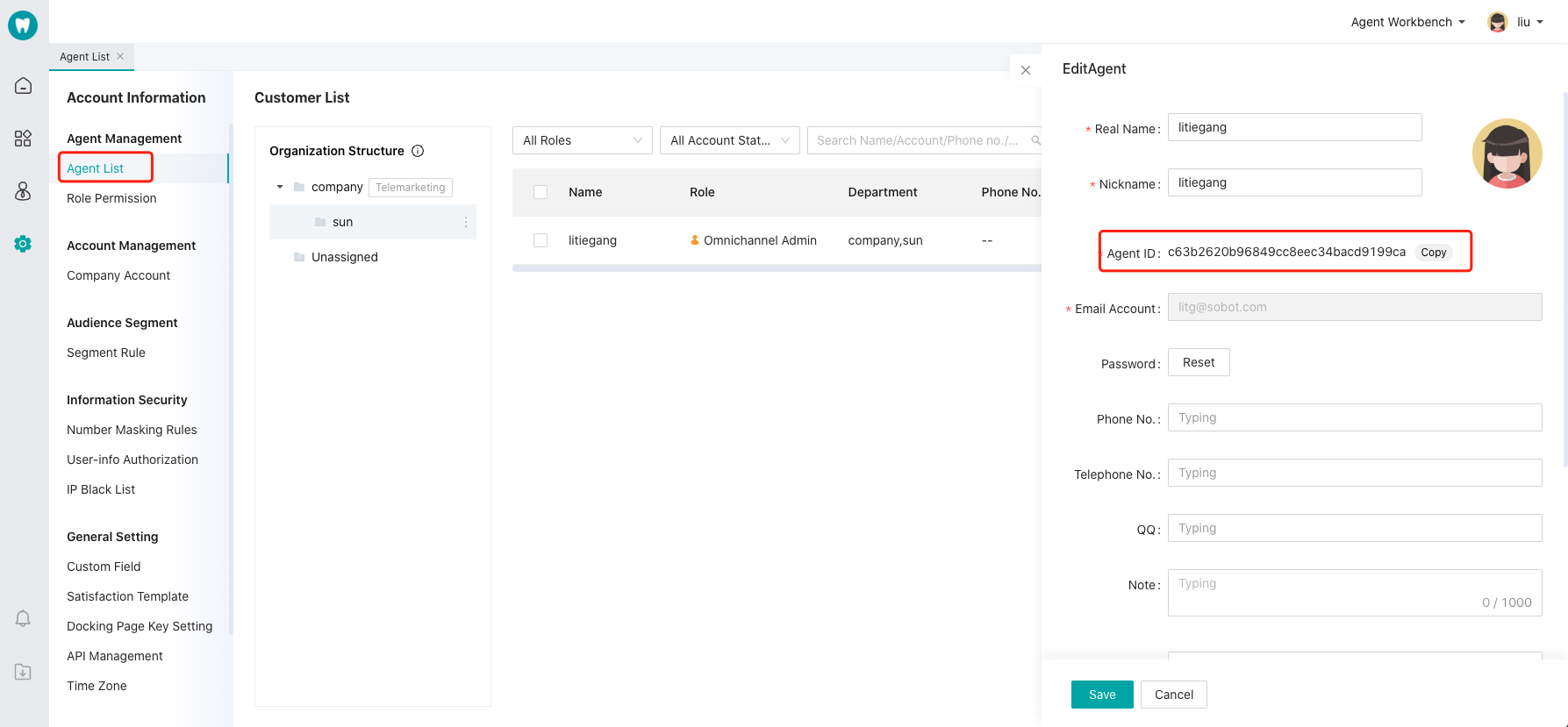
ZCLibInitInfo *initInfo = [ZCLibClient getZCLibClient].libInitInfo;
LibInitInfo.choose_adminid = @"Customer Service ID";
libInitInfo.tran_flag =  @"0";
Parameter Description: Parameters
Parameter NameTypeDescription
choose_adminidNSStringSpecify the customer service to connect. If not set, use the default value.
tran_flagint0: Can be transferred to other customer service; 1: Must be transferred to a specified customer service. If set to 1, when the specified customer service is offline, it cannot be transferred to other customer service.

5. Set User Custom Profile and Custom Fields

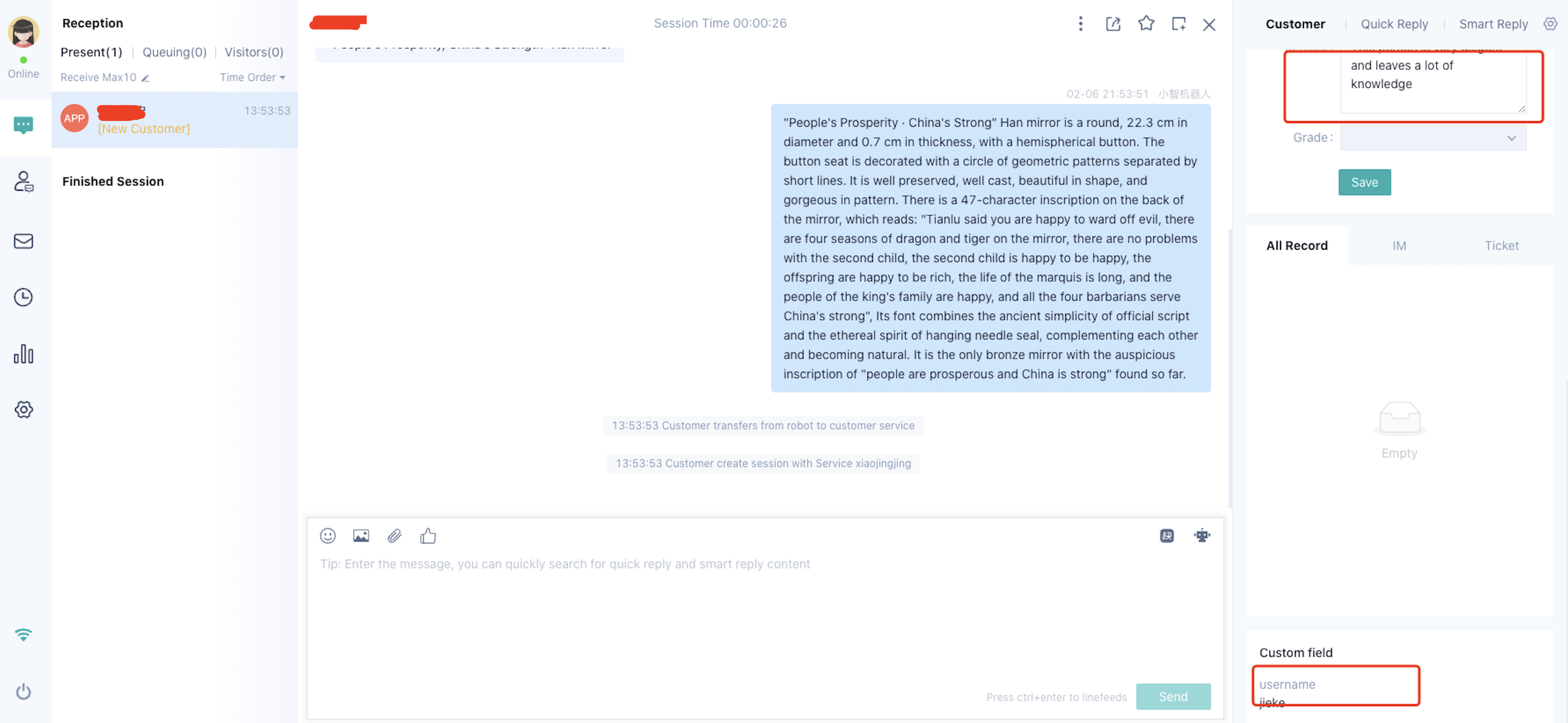
Developers can directly pass in these user details for customer service to view. Configure the fields you need to display on the workbench by yourself. The configuration method is as shown in the figure below: Image Custom fields with fixed keys
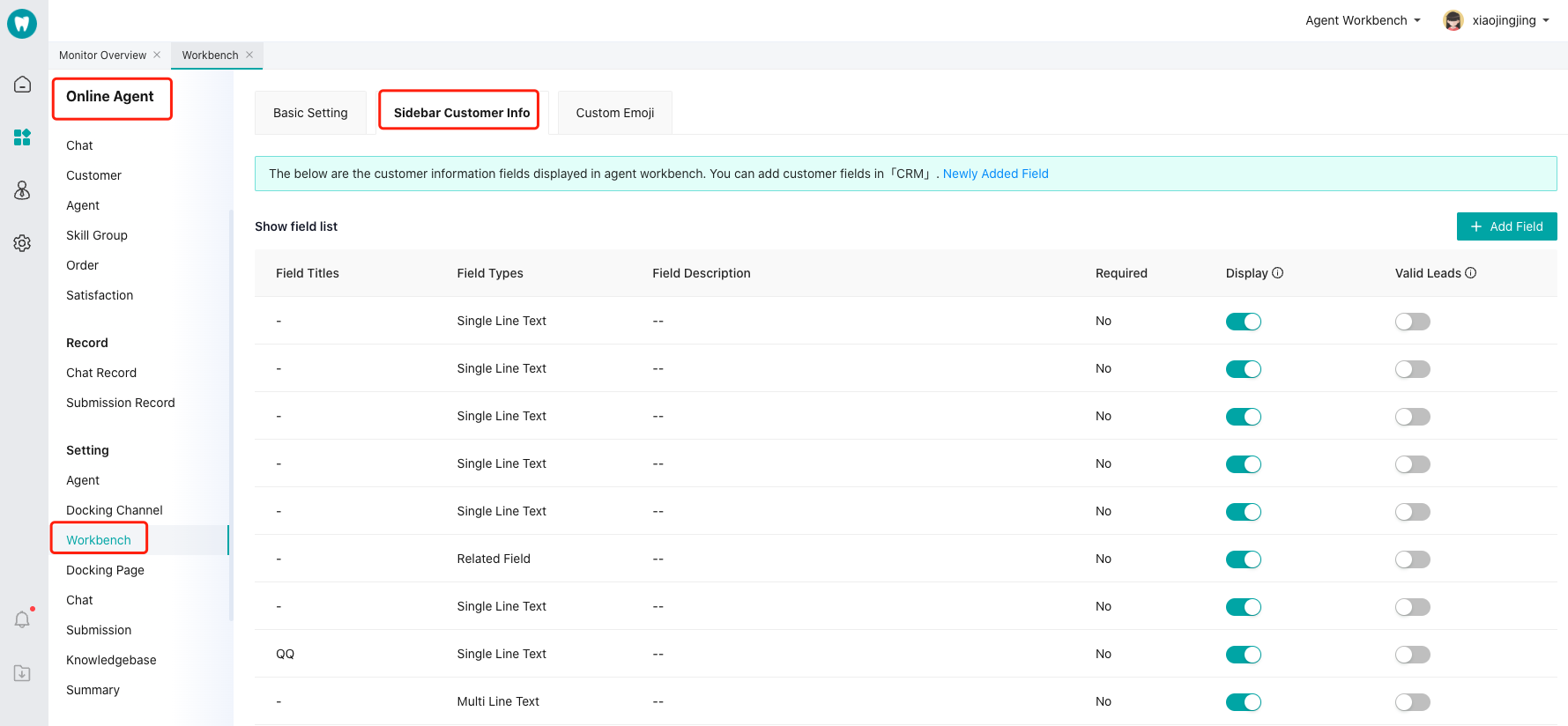
// Set custom user fields
- (void)customUserInformation:(ZCLibInitInfo*)libInitInfo{
LibInitInfo.customer_fields = @{@"customField22":@"I am a custom branch",
@"userSex":@"Confidential",
@"weixin":@"WeChat ID",
@"weibo":@"Weibo account",
                              @"birthday":@"2017-06-08"};
}
User-defined data, custom key
//Custom user data
LibInitInfo.params = @{@"Nickname":@"I am the ZhiChi customer service representative"};

The effect picture is as follows: Image

6. Set up priority access for designated customers in the queue

The SDK can set the current user’s queue priority. When this user enters the queue, they will be served first.
// Same as PC: Settings - Online Customer Service Allocation - Queue Priority Settings - Priority for Specified Customers. Set to 1 to enable, default is not set.
@property(nonatomic,assign) int queue_first;

7. Set Service Summary Custom Fields

The SDK can configure custom fields for service summaries, enabling customer service to create session summaries more quickly.
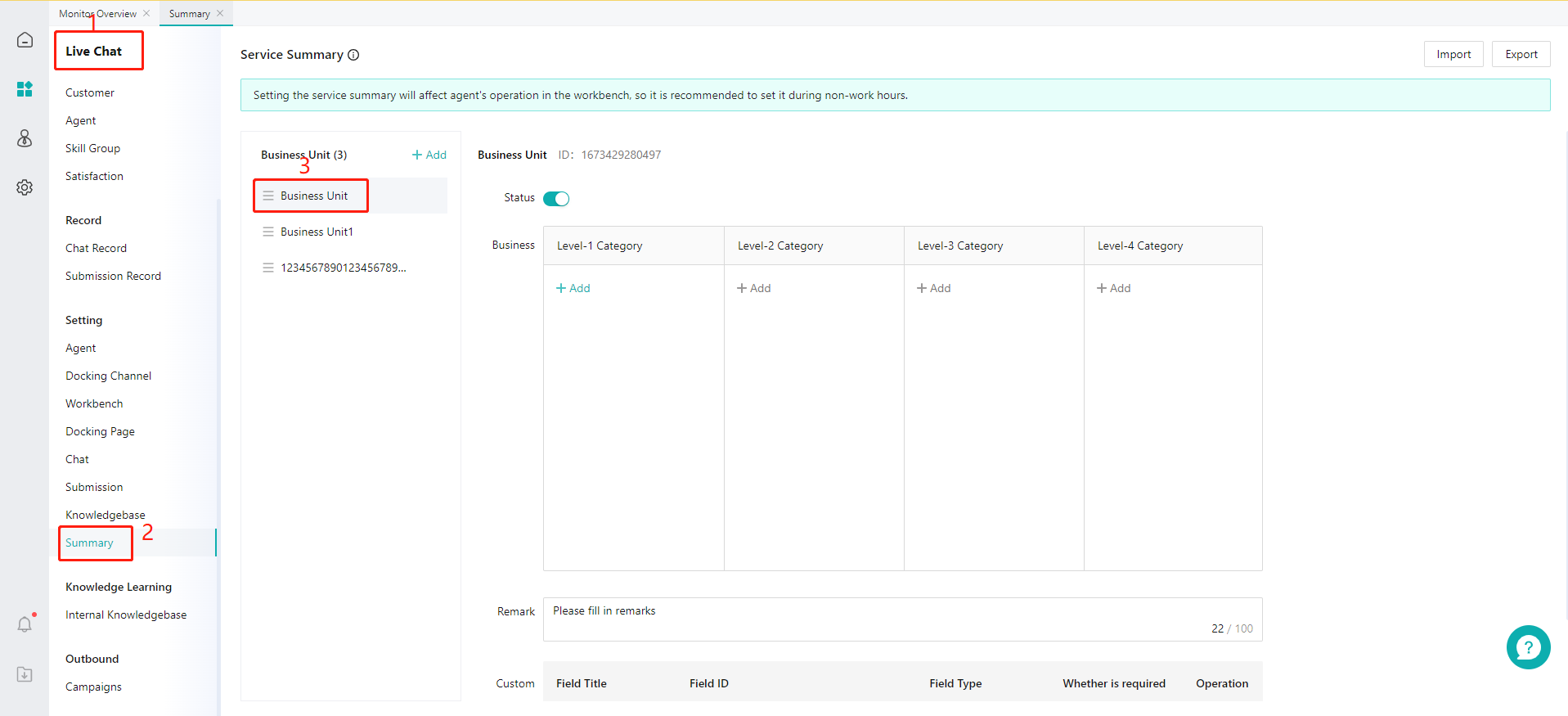
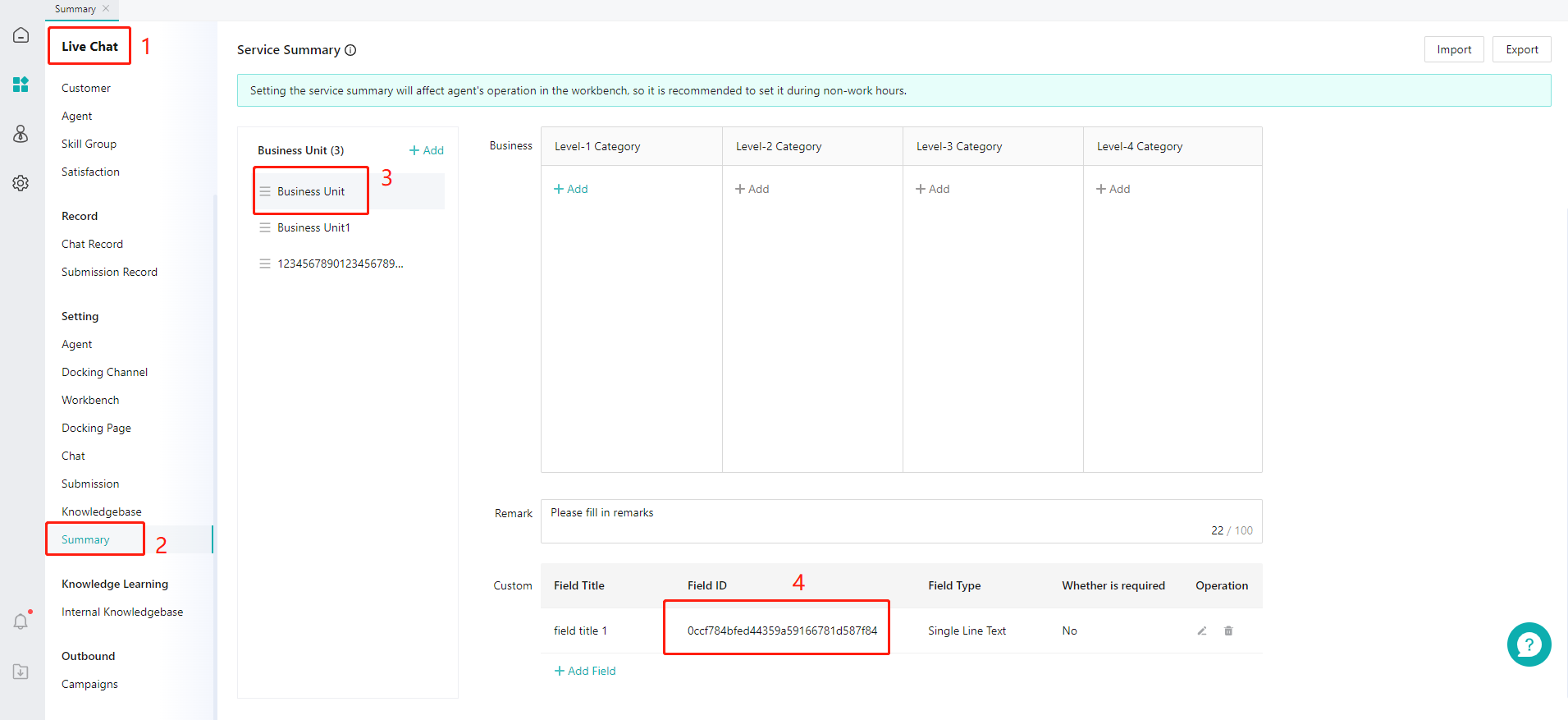
  1. Get Custom Field ID
Image Image
  1. Set custom fields for service summary (Support transferring to human agents with service summary parameters)
InitInfo.summary_params = @{@"customField15615315349481":@"Field value1",@"customField15615315349482":@"Field value2"};

8. Set Multi-turn Conversation Interface Parameters

When using the multi-round conversation feature, we pass two fixed custom parameters, uid and mulitParams, to each interface. The uid is the unique identifier for the user, and mulitParams is a custom field in JSON string format. If the user has integrated these two fields, we will pass them back to the third-party interface. If not, we will pass empty fields.

InitInfo.multi_params = @{@"customField15619769556831":@"Display xxyyyzzz1032"};

9. Set VIP level and user tags

/**
 *
 *  Specify whether the customer is a VIP, 0: Regular 1: VIP
* Same as PC: Settings - Online Customer Service Assignment - Queue Priority Settings - VIP Customer Queue Priority. Enable by passing 1. Default is not set.
* After enabling, when a specified customer initiates a consultation and if there is a queue, the system will prioritize access.
 **/
@property (nonatomic,copy) NSString *isVip;


/**
 *
* Specify the VIP level for the customer and pass in the level.
* Same as PC端: Go to Settings - Custom Fields - VIP Level, and get the ID or name corresponding to the level.
 **/
@property (nonatomic,copy) NSString *vip_level;


/**
*User tags, multiple fields separated by commas;
User tags can be edited in the ZhiChi management console (System Settings > Custom Fields > Customer Fields). Obtain the ID or name corresponding to the user tag.
 **/
@property (nonatomic,copy) NSString *user_label;

Pass the relevant fields in ZCLibInitInfo.
eg:
ZCLibInitInfo *libInitInfo = [ZCLibClient getZCLibClient].libInitInfo;
// Set VIP level by name
LibInitInfo.vip_level = @"VIP";
//You can add multiple user tags. Separate multiple tag IDs or names with ,.
LibInitInfo.user_label = @"Star, Journalist";

Conversations and Messages

1. Message Push Notifications

[Note: If you need the SDK push function, please refer to the following message notifications and registration push related code. If your project does not need it, please ignore.]
  1. When generating the appkey, upload the push certificate (.p12 format). The exported certificate must have a password;
  2. Push notifications are only effective for manual conversations. The robot answers directly without push notifications. When local IM communicates normally, it will directly use the IM channel and will not send APNS push notifications.
Relevant configurations and code Push ZCLibClient.h Key Attribute Description
/**
Push token
The app needs to be reset every time it is launched.
*/
@property (nonatomic,strong) NSData *token;
/**
Test mode,
The push certificate called according to this setting defaults to NO.
NO, call the production environment
YES, Test Environment
*/
@property (nonatomic,assign) BOOL isDebugMode;

/**
Automatic reminder messages
Description: If you turn on the automatic reminder messages, when you are not on the ZhiChi chat page, all messages will be actively displayed as local notifications.
This reminder is a local message push. It is unrelated to APNS and is only a notification for local IM messages not on the chat page.
*/
@property (nonatomic,assign) BOOL autoNotification;


/**
Exit the backend, automatically close long connections, default NO
Explanation: If set to YES, the channel will close immediately after exiting the background, without affecting the duration of the app's background suspension.
 */
@property (nonatomic,assign) BOOL autoCloseConnect;

/**
Get the number of unread messages
@return Number of unread messages (entering the ZhiChi chat page will clear them)
*/
-(int) getUnReadMessage;
Register for Push Notifications Register for push notifications in the AppDelegate.m file. Import header files
#import <SobotKit/SobotKit.h>
#import <UserNotifications/UserNotifications.h>
#define SYSTEM_VERSION_GRATERTHAN_OR_EQUALTO(v)  ([[[UIDevice currentDevice] systemVersion] compare:v options:NSNumericSearch] != NSOrderedAscending)
Agree to the terms

<UIApplicationDelegate,UNUserNotificationCenterDelegate>

Register
- (BOOL)application:(UIApplication *)application didFinishLaunchingWithOptions:(NSDictionary *)launchOptions {
    // Override point for customization after application launch.
    
    [[UIApplication sharedApplication] setStatusBarHidden:YES withAnimation:UIStatusBarAnimationNone];
    [[UIApplication sharedApplication] setStatusBarHidden:NO withAnimation:UIStatusBarAnimationNone];
    
    if (SYSTEM_VERSION_GRATERTHAN_OR_EQUALTO(@"10")) {
        UNUserNotificationCenter *center = [UNUserNotificationCenter currentNotificationCenter];
        center.delegate = self;
        [center requestAuthorizationWithOptions:(UNAuthorizationOptionSound | UNAuthorizationOptionAlert |UNAuthorizationOptionBadge) completionHandler:^(BOOL granted, NSError * _Nullable error) {
            if (!error) {
                [[UIApplication sharedApplication] registerForRemoteNotifications];
            }
        }];
    }else{
         [self registerPush:application];
    }
    [[ZCLibClient getZCLibClient].libInitInfo setApp_key:@"your appKey"];
    // Set whether the push is in the test environment. The test environment will use the development certificate.
    [[ZCLibClient getZCLibClient] setIsDebugMode:YES];
    // Error log collection
    [ZCLibClient setZCLibUncaughtExceptionHandler];
    return YES;
}
 
-(void)registerPush:(UIApplication *)application{
    // After iOS8, you need to add this registration to get authorization.
    if ([[UIApplication sharedApplication] respondsToSelector:@selector(registerUserNotificationSettings:)]) {
        //IOS8
        // Create UIUserNotificationSettings and set the display type of messages
        UIUserNotificationSettings *notiSettings = [UIUserNotificationSettings settingsForTypes:(UIUserNotificationTypeBadge | UIUserNotificationTypeAlert | UIRemoteNotificationTypeSound) categories:nil];
        
        [application registerUserNotificationSettings:notiSettings];
        
    } else{ // ios7
        [application registerForRemoteNotificationTypes:(UIRemoteNotificationTypeBadge|UIRemoteNotificationTypeSound|UIRemoteNotificationTypeAlert)];
    }
}

- (void)application:(UIApplication *)application didRegisterForRemoteNotificationsWithDeviceToken:(NSData *)pToken{
    NSLog(@"---Token--%@", pToken);
    // Register token
    [[ZCLibClient getZCLibClient] setToken:pToken];

}

2. Set whether to enable message notifications

When the user is not on the chat interface and receives a message from customer service, the app can provide reminders in the notification bar or at the chat entry. The notification bar reminder can display the content of the most recent message.
// Whether to automatically remind. When the user is not on the chat page, send a local push notification upon receiving a local connection message.
[[ZCLibClient getZCLibClient] setAutoNotification:YES];
 
// Set up the push environment
[ZCSobotApi setShowDebug:YES]; 

3. Offline Messages

Offline Message Settings

// Set to automatically disconnect long connections when switching to the background. This will not affect the duration of the app being suspended in the background.
// It will automatically reconnect upon entering the front desk. Messages will be sent via APNS push notification during disconnection.
[ZCLibClient getZCLibClient].autoCloseConnect = YES;


// @note Check if the current message channel is established. If not, re-establish it. After calling closeIMConnection, you can call this method to reconnect.
[[ZCLibClient getZCLibClient] checkIMConnected];  
/* Check if the current listener is removed. If removed, register again (reactivate).
Network Listening ZCNotification_NetworkChange
 UIApplicationDidBecomeActiveNotification
 UIApplicationDidEnterBackgroundNotifica
), often used together with checkIMConnected
*/
[[ZCLibClient getZCLibClient] checkIMObserverWithRegister];
/**
Removing all IM listeners may affect the app's background running time. If you need to reactivate after calling this method, use checkIMObserverWithCreate.
Network Listening ZCNotification_NetworkChange
 UIApplicationDidBecomeActiveNotification
 UIApplicationDidEnterBackgroundNotification
 */
[[ZCLibClient getZCLibClient] removeIMAllObserver];

/**
@note Close the current message channel so it no longer accepts messages. If push is configured, messages will be delivered via APNs.
 */  
 [[ZCLibClient getZCLibClient] closeIMConnection];


// ReceivedMessageBlock Number of unread messages, obj Current message, unRead Number of unread messages
 [ZCLibClient getZCLibClient].receivedBlock = ^(id obj,int unRead,NSDictionary *object){
//        NSLog(@"Current number of messages: %d \n %@", unRead, obj);
    };
    
// Close the channel, clear memory, and exit the ZhiChi customer service (If the current status is human consultation, the customer will go offline; if it is robot status, the current session will be directly interrupted, and the next entry will start a new session).
// Note: After calling this method, you will not receive offline messages unless you reactivate it by re-entering the ZhiChi SDK.
// isClosePush:YES, means to close push; NO for offline users, but they can still receive push notifications
+(void) closeAndoutZCServer:(BOOL) isClosePush; 
//Example
[ZCLibClient  closeAndoutZCServer:YES];

4. Unread Message Count Operations

//Directly get the number of unread messages
[ZCSobotApi getUnReadMessage]
// Clear unread message count
 [ZCSobotApi clearUnReadNumber:@"partnerid"];

5. Send Location Message

Send location information. This method can only initiate a location call when the initialization link is received and the URL is listened to as sobot://sendlocation. Otherwise, the sending may fail.
ZCKitInfo *uiInfo=[ZCKitInfo new];

// Configure the send button. Note that menu1.url = sobot://sendlocation is monitored in messageLinkClick on the launch page.
NSMutableArray *arr = [[NSMutableArray alloc] init];
    for (int i = 0; i<1; i++) {
        ZCLibCusMenu *menu1 = [[ZCLibCusMenu alloc] init];
Menu1.title = [NSString stringWithFormat:@"Location"];
        menu1.url = [NSString stringWithFormat:@"sobot://sendlocation"];;
        menu1.imgName = @"zcicon_sendlocation";
        [arr addObject:menu1];
        ZCLibCusMenu *menu2 = [[ZCLibCusMenu alloc] init];
Menu2.title = [NSString stringWithFormat:@"Product"];
        menu2.url = [NSString stringWithFormat:@"sobot://sendProductInfo"];;
        menu2.imgName = @"zcicon_sendpictures";
        [arr addObject:menu2];
    }
uiInfo.cusMoreArray = arr;


// Method to send location, fullPath is the complete local path of the image
[ZCSobotApi sendLocation:@{
                        @"lat":@"40.001693",
                        @"lng":@"116.353276",
@"localLabel":@"23rd Floor, Building A, Jinma Tower, No. 38 Xueqing Road, Haidian District, Beijing",
@"localName":@"Cloud View Seasons Restaurant",
                        @"file":fullPath}];
Set the message link listener messagelinkBlock to intercept link redirection. If the block returns YES, it means the current link event is handled by itself, and the internal system will not display the link.

/// Click the link to intercept Help Center, messages, chat, and message history
/// @param messagelinkBlock Get the link. If it returns YES, then intercept it.
     [ZCSobotApi setMessageLinkClick:^BOOL(ZCLinkClickType type, NSString * _Nonnull linkUrl, id  _Nullable object) {
        return NO;
    }];

6. Listen for changes in the current chat mode

You can do this by initializing the previous code:
    
// Current user session status
typedef NS_ENUM(NSInteger,ZCServerConnectStatus) {
    ZCServerConnectOffline    = 0, // The current session has ended
    ZCServerConnectRobot      = 1, // Robot
    ZCServerConnectArtificial = 2, // Artificial connection successful
    ZCServerConnectWaiting    = 3  // Queue for manual support only
};
[[ZCLibClient getZCLibClient] setServerConnectBlock:^(id message, ZCServerConnectStatus status, NSDictionary *object) {
       
        
    }];
    
    
/// Click the back function event listener, use setFunctionClickListener to replace
/// @param backBlock id of the current viewcontroller, type: help center, message, chat, session list
+(void)setZCViewControllerBackClick:(void (^)(id currentVC,ZCPageCloseType type))backBlock;
    

7. Regular expression for replacing mobile or landline numbers in messages

Change the rules for identifying your own phone number:
    
/**
*  Regular expression for phone numbers
 *  Default is @"0+\d{2}-\d{8}|0+\d{2}-\d{7}|0+\d{3}-\d{8}|0+\d{3}-\d{7}|1+[34578]+\d{9}|\+\d{2}1+[34578]+\d{9}|400\d{7}|400-\d{3}-\d{4}|\d{11}|\d{10}|\d{8}|\d{7}"
 * For example: 82563452, 01082563234, 010-82543213, 031182563234, 0311-82563234
 、+8613691080322、4008881234、400-888-1234
 */
@property (nonatomic,strong) NSString * telRegular;

Change the recognition rules for hyperlinks in messages:
    

/**
 *  Link address regular expression
 *  Default is:
    @"((http[s]{0,1}|ftp)://[a-zA-Z0-9\\.\\-]+\\.([a-zA-Z0-9]{1,4})(:\\d+)?(/[a-zA-Z0-9\\.\\-~!@#$%^&*+?:_/=<>]*)?)|(([a-zA-Z0-9]{2,4}).[a-zA-Z0-9\\.\\-]+\\.([a-zA-Z]{2,4})(:\\d+)?(/[a-zA-Z0-9\\.\\-~!@#$%^&*+?:_/=<>]*)?)"
 */
@property (nonatomic,strong) NSString * urlRegular;


9. Hide Time Prompts in the Message List


/**
      Whether to hide the session time. The default is NO, not hidden. If it is not in the China region, there may be a time difference between the client's real time and the session time, so you can choose to hide the time in the session.
*/
@property (nonatomic,assign) BOOL hideChatTime;


10. Configure Automatic Message Content After Access

You can pre-configure related consultation questions. After entering the chat page, a consultation will be automatically initiated in the customer’s identity.
// Automatically send messages
ZCLibInitInfo *initInfo = [ZCLibClient getZCLibClient].libInitInfo;
// 0 Do not send 1 Send to robot 2 Send to human 3 Send to both robot and human
initInfo.good_msg_type = 1; 
// If it is non-text, pass the local path
initInfo.content = @"123";
// Content type, 0, // Text 1, // Image 12, // File // Video
initInfo.auto_send_msgtype = 0;


/// Send message to human agent
/// @param textMsg  Message content. If it is a video, image, audio, or file, please pass the local image path.
/// @param msgType  0, // Text   1, // Image  4, // File   3, // Video
/// @param ResultBlock Sending result code == 0 means it has been sent
+ (void)sendMessageToUser:(NSString *)textMsg type:(NSInteger ) msgType resultBlock:(nonnull void (^)(NSString *, int code))ResultBlock;


11. Configure Sending Product Cards

Product inquiry information supports sending message cards directly only in manual mode. Configure the following information in ZCKitInfo.h, and pass it in when launching the page:
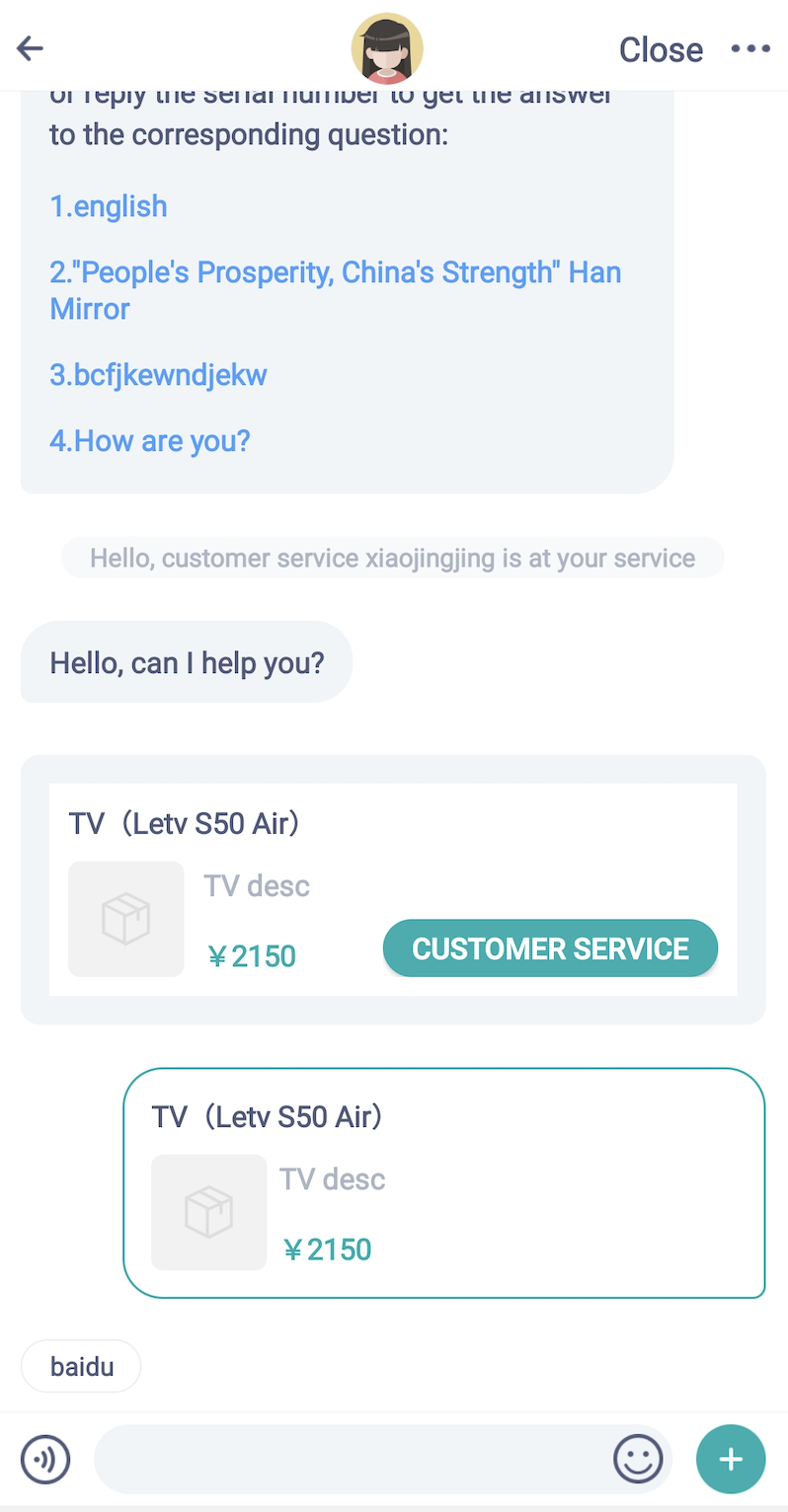

/**
*   Whether to automatically send product card information (automatically send product card information when successfully transferred to a human agent)
*   Default is off. After turning on, it will only send once per session by default.
 **/
@property (nonatomic,assign) BOOL isSendInfoCard;

/*
   Does it automatically send product information every time (when transferring to a human agent is successful, the product card information will be sent automatically)?
Need to enable isSendInfoCard = YES first
(Added in version 3.0.3)
 */
@property (nonatomic,assign) BOOL isEveryTimeSendCard;

// Custom class for products: ZCProductInfo. If you choose to add product information, please include the following details. The title "title" and page URL "link" are required fields. If these are not added, the information will not display on the page.
ZCProductInfo *productInfo = [ZCProductInfo new];
//thumbUrl Thumbnail URL
ProductInfo.thumbUrl = @"URL of the thumbnail";
// title Title (Required)
ProductInfo.title = @"Title";
// Summary description
ProductInfo.desc = @"Summary";
// label tag
ProductInfo.label = @"Tag";
// Page address URL (required)
ProductInfo.link = @"Send product link";
kitInfo.productInfo = productInfo;


// Manually trigger to directly send product card
ZCProductInfo *productInfo = [ZCProductInfo new];
ProductInfo.thumbUrl = @"Thumbnail URL";
ProductInfo.title = @"Title";
ProductInfo.desc = @"Summary";
ProductInfo.label = @"Label";
ProductInfo.link = @"Page link";
[ZCSobotApi sendProductInfo:productInfo resultBlock:nil];
Rendering: Image

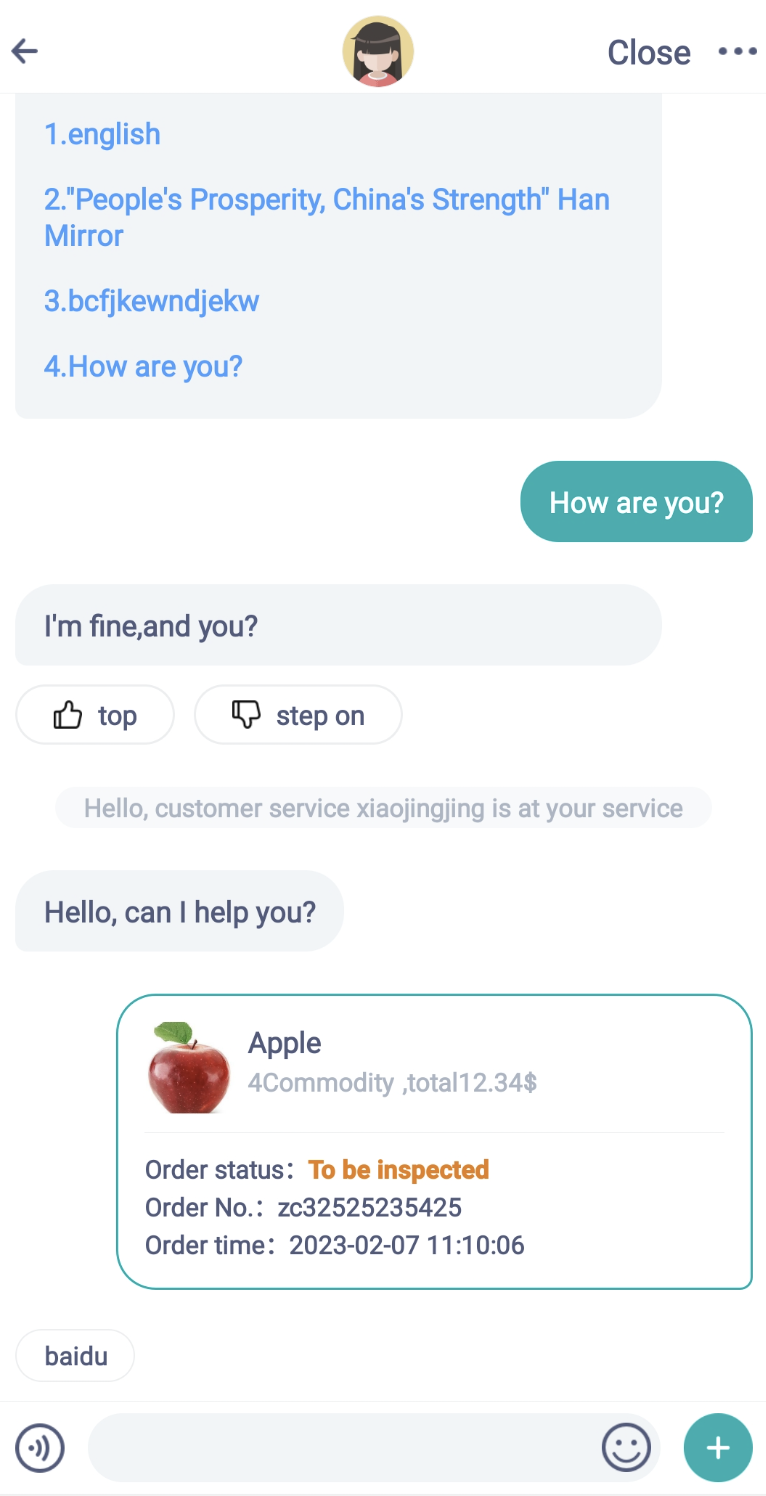
12. Order Card

The SDK can send custom order information, but this is only supported in manual mode. If you have this requirement, you can use the following method to set it up: Configuration Button:
ZCKitInfo *kitInfo=[ZCKitInfo new];
NSMutableArray *arr = [[NSMutableArray alloc] init];
ZCLibCusMenu *menu1 = [[ZCLibCusMenu alloc] init];
Menu1.title = [NSString stringWithFormat:@"Order"];
menu1.url = [NSString stringWithFormat:@"sobot://sendOrderMsg"];;
menu1.imgName = @"zcicon_sendpictures";
[arr addObject:menu1];
kitInfo.cusMoreArray = arr;
Simulate custom ”+” click send event:
Return YES to indicate event interception, and let the user handle it manually. Returning NO means the event is not intercepted and will be handled internally by the ZhiChi SDK.
     [ZCSobotApi setMessageLinkClick:^BOOL(ZCLinkClickType type, NSString * _Nonnull linkUrl, id  _Nullable object) {
     if ([linkUrl hasPrefix:@"sobot://sendOrderMsg"]){
                        ZCOrderGoodsModel *model = [ZCOrderGoodsModel new];
                            model.orderStatus = 0; // Add 0 as a custom status to display statusCustom content
                            model.statusCustom = @"Custom Status";
                        model.createTime = [NSString stringWithFormat:@"%.0f",[[NSDate date] timeIntervalSince1970]*1000];
                        model.goodsCount = @"3";
                        model.orderUrl  = @"https://www.sobot.com";
                        model.orderCode = @"1000234242342345";
                            model.goods =@[@{@"name":@"Product Name",@"pictureUrl":@"http://pic25.nipic.com/20121112/9252150_150552938000_2.jpg"},@{@"name":@"Product Name",@"pictureUrl":@"http://pic31.nipic.com/20130801/11604791_100539834000_2.jpg"}];
                        
                            // The unit is cents. It will be divided by 100 when displayed, such as 48.90.
                        model.totalFee = @"4890";
                        [ZCSobotApi sendOrderGoodsInfo:model resultBlock:nil];
                        
                        return YES;
                    }
                return NO;
    }];
ZCOrderGoodsModel Class Description:
/**
Send order message field:
Order Status: orderStatus
Order Number: orderCode
Order creation time: createTime
Product image link: goodsPicturesUrls
Order link: orderUrl  ,
Product Description: goodsDesc
 Number of items: goodsCount
Total amount: totalFee, in cents. It will be automatically formatted to yuan when displayed. For example, if 4890 is passed in, it will display as 48.90 yuan.
*/
/*
Customize: 0, show the content of statusCustom
Pending Payment: 1,
To be shipped: 2,
In transit: 3,
Out for delivery: 4,
Completed: 5,
To be reviewed: 6,
Cancelled: 7,
Other: Not in the code
 */
@property (nonatomic,assign) int orderStatus;

// Custom order status display content, only effective when orderStatus=0
@property (nonatomic,strong) NSString *statusCustom;

Renderings: Image

12. Send custom cards to the conversation record to recommend to customers in a systematic way

Custom Card Parameter Description Document

eg:

//1. Create SobotChatCustomCard data

SobotChatCustomCard *cardModel = [[SobotChatCustomCard alloc] init];

// Configure top guide text, image, and card description
CardModel.cardGuide = @"I am the guide card language, test data...............";
CardModel.cardDesc = @"I am the guide card content desc, test data...............";
cardModel.cardImg = @"https://www.sobot.com/images/books/help/logo-efa3cf68e3.png";
cardModel.cardLink = @"https://www.sobot.com";
cardModel.cardType = 1;
CardModel.isCustomerIdentity = 0;// New field added in version 4.1.4, optional parameter, 0 System identity sends 1 Customer identity sends
// Configure custom click button
NSArray *menuTitles = @[@"View Details",@"I am a very long test aaaaaaaaassss",@"Send"];
NSMutableArray *arrMenu = [[NSMutableArray alloc] init];
for(int i=0;i<3;i++){
   SobotChatCustomCardMenu *menu = [[SobotChatCustomCardMenu alloc] init];
   menu.menuTip = @"menutip Click the button for a prompt";
   menu.menuLink = @"sobot://?link";
   menu.menuType = i;
   menu.menuName = sobotConvertToString(menuTitles[i]);
   menu.menuLinkType = i;
   [arrMenu addObject:menu];
}
  cardModel.cardMenus = arrMenu;
  
// Configure the custom card middle list section
NSMutableArray *arrInfo = [[NSMutableArray alloc] init];
for(int i=0;i<3;i++){
   SobotChatCustomCardInfo *cardInfo = [[SobotChatCustomCardInfo alloc] init];
   cardInfo.customCardName = [NSString stringWithFormat:@"1%d I am the card name",i];
   cardInfo.customCardThumbnail = @"https://t10.baidu.com/it/u=3829074670,206323120&fm=30&app=106&f=JPEG?w=312&h=208&s=159E7F97C67C578C3C50FCEB0300B035";
   cardInfo.customCardId = cardModel.cardId;
   cardInfo.customCardDesc = @"I am a card description. I am a card description. I am a card description. I am a card description. I am a card description.";
   cardInfo.customCardCode = @"code000cc1";
   cardInfo.customCardLink = @"https://www.sobot.com/en";
   cardInfo.customCardTime = @"2023-06-09 17:11:10";
   cardInfo.customCardStatus = @"I am cardStatus";
   cardInfo.customCardAmountSymbol = @"¥";
   cardInfo.customCardAmount = @"6888.00";
   cardInfo.customMenus = [[NSMutableArray alloc] initWithArray:arrMenu];
   cardInfo.customCardCount = @"3";
   cardInfo.customCardQuestion = @"The question of the first issue";//Added in version 4.1.4, optional parameter, used to trigger knowledge base questions when sending to the robot
   [arrInfo addObject:cardInfo];
}
            
cardModel.customCards = arrInfo;
// Configure custom fields
cardModel.customField = @{
@"Time":@"Custom 2023-6-9",
@"Position 1":@"Somalia",
@"Position 2":@"Colombia",
@"Location3":@"San Diego",
@"Status":@"Test Status",
@"Completed":@"Customer has signed for it"
};
cardModel.cardStyle = 1;
CardModel.cardId = @"Order ID";
            
2. Call the send custom card API to send a custom card
[ZCSobotApi sendCustomCardToRecord:cardModel resultBlock:^(NSString * _Nonnull msg, int code) {
                
}];

13. End Session

Not required, the session will automatically stay connected and disconnect.

/// Close the channel, clear memory, exit ZhiChi customer service, and remove push notifications.
/// @param isClosePush YES to close push; NO for offline users, but able to receive push notifications
[ZCSobotApi outCurrentUserZCLibInfo:NO];

Other Function Configurations

1. Customize the display time range for chat history

If you want to set users to only see chat records within xx days, you can call the following method to make the setting:
/**
History record time range, in minutes (Example: 100 - represents sessions from 100 minutes ago up to now)
 */

@property(nonatomic,assign) int scope_time;

2. ”+” Panel Menu Extension

In the customer service chat interface, after clicking the ”+” button, a menu panel will appear. You can add menus as needed. The code is as follows:
    ZCKitInfo *uiInfo=[ZCKitInfo new];
    NSMutableArray *arr = [[NSMutableArray alloc] init];
    for (int i = 0; i<1; i++) {
        ZCLibCusMenu *menu1 = [[ZCLibCusMenu alloc] init];
        menu1.title = [NSString stringWithFormat:@"Order"];
        menu1.url = [NSString stringWithFormat:@"sobot://sendOrderMsg"];
        menu1.imgName = @"zcicon_sendpictures";
        [arr addObject:menu1];
        
        ZCLibCusMenu *menu2 = [[ZCLibCusMenu alloc] init];
        menu2.title = [NSString stringWithFormat:@"Product"];
        menu2.url = [NSString stringWithFormat:@"sobot://sendProductInfo"];
        menu2.imgName = @"zcicon_sendpictures";
        
        [arr addObject:menu2];
    }
    
    
    uiInfo.cusMoreArray = arr;
    
    uiInfo.cusRobotMoreArray = arr;
Configuration Information Description:

/**
* Content below the custom input box's more (+ icon) button (will not replace existing content, will append to the original content)
* Change the button for manual mode
* Fill in the content: ZCLibCusMenu.h
* title: Button Name
* url: Click the link (Clicking will call the initialization of linkBock)
* imgName: Local image name, such as [email protected], icon=xxx
 */
@property (nonatomic,strong) NSMutableArray * cusMoreArray;

/**
* Content below the custom input box's more (+ icon) button (does not replace existing content, will be appended to the original content)
* Button to modify robot mode
 * Fill in the content: ZCLibCusMenu.h
* title: Button Name
* URL: Click the link (Clicking will call the initialization of linkBock)
* imgName: Local image name, such as [email protected], icon=xxx
 */
@property (nonatomic,strong) NSMutableArray * cusRobotMoreArray;

3. Call up the dialing interface API

/**
 *  Set phone number
* When the dial button is displayed in the upper right corner of the navigation bar (effective when set together with isShowTelIcon)
 *
 **/
@property (nonatomic,copy) NSString * customTel;
/**
 *
*   Whether to display the dial button in the upper right corner of the navigation bar. Default is not displayed. Note: Mutually exclusive with isShowEvaluation. Only one can be set as valid.
 *
 **/
@property (nonatomic,assign) BOOL isShowTelIcon;

4. Wisdom Tooth Log Display Switch

/**
* Show log information
 *
* @param isShowDebug Not shown by default
 */
+(void) setShowDebug:(BOOL) isShowDebug;

5. IOS Multi-language Support

Currently, the SDK supports two languages: English and Chinese. The language will automatically switch and adapt based on the current phone language. If the current phone language is not recognized, it will default to Chinese. Language files are unified in the SobotKit.bundle file. If you need to add a new language package, place the supported language file in the corresponding language directory. For example: English path: SobotKit.bundle/en_lproj/SobotLocalizable.strings, Chinese path: SobotKit.bundle/zh-Hans_lproj/SobotLocalizable.strings; [Note: The language folder name is the current language name followed by _lproj, such as zh-Hans_lproj, en_lproj]

//Get language name
NSString * languages = [ZCSobotApi getCurLanguagePreHeader];


    ZCLibInitInfo *initInfo = [ZCLibClient getZCLibClient].libInitInfo;

// Set the default language. If the current system language cannot be recognized, the default language is not set to en_lproj.
initInfo.default_language = @"zh-Hans_lproj";

// Specify the language, do not change based on the system. If the specified language is not found, follow the default language logic.
initInfo.absolute_language = @"ar_lproj";


// Download language (provided after 2.8.6). If you need support for languages other than those in the bundle package, you can provide us with the translations to add them to our server for dynamic synchronization.
/// Sync language files from the server
/// @param lan  The language to synchronize. If it already exists in the local bundle, it will not be downloaded, en_lproj, zh-Hans_lproj
/// @param isReWrite  Whether to download again if it has already been downloaded
+(void)synchronizeLanguage:(NSString *) language write:(BOOL) isReWrite;


6. Set Dark Mode

Starting from version 2.8.5, dark mode is supported. By default, it adapts automatically based on the phone’s system settings; it can also be forcefully specified for use, with the configuration as follows:

	ZCKitInfo *uiInfo=[ZCKitInfo new];
	// Default is 0, follow system settings, 1 forces dark style, 2 forces highlight style
    uiInfo.themeStyle = 1;
   
   // Default is YES. Custom color attributes will be invalid when in dark mode.
   // To keep custom colors effective in dark mode, set it to NO.
    uiInfo.useDefaultDarkTheme = YES;

7. Time Zone Adaptation

Starting from version 2.8.9, it is supported by default. The system uses Beijing East Eight Zone standard time. If dynamically adapting based on mobile phone time, configure the following code:

[ZCSobotApi setAutoMatchTimeZone:YES];

8. Wisdom tooth partial function page click return and event listening (record only, do not intercept), you can add your own logic (e.g., tracking points)


    [ZCSobotApi setFunctionClickListener:^(id _Nonnull obj, ZCPageCloseType type) {
        	 //1: Return from message, 2: Return from session page, 3: Return from help center, 4: Return from e-commerce message center page, 5: Call button for making phone calls
NSLog(@"Click returned %@, %zd", obj, type);
    }];

9. Security Verification

  1. Function location: Online channel settings - Channel security settings - Security key settings - Check “Effective scope (APP)”.
  2. After enabling the APP “Security Key” function, the SDK channel must pass the partnerid parameter. When integrating, add the parameters “sign” and “create_time”. Here, sign = “MD5(app_key + partnerid + secret + create_time)”, createTime is a Unix millisecond timestamp; secret is a 32-character string, and create_time is a millisecond-level timestamp.
  3. After passing parameters, ZhiChi will decrypt the sign and verify whether the passed partnerid matches the partnerid in the sign. If they match, the system will connect to ZhiChi normally. If they do not match, the connection will fail. If the customer does not pass the partnerid or sign, it will be considered an illegal user, and the connection will fail. If the create_time differs from the current time by more than 5 minutes, it will be considered an illegal user, and the connection will fail.
  4. The function of enabling and disabling the “Security Key” in the APP takes effect in real time.

ZCLibInitInfo *initInfo = [ZCLibClient getZCLibClient].libInitInfo;

// Set encryption time
_libInitInfo.create_time = [ZCSobotApi zcGetCurrentTimes];
_libInitInfo.secret = @"Encryption string";
_libInitInfo.partnerid = @"your id";
// The string after md5,
_libInitInfo.sign = [self getSign];


// Reference implementation method
-(NSString *)getSign{
    NSString *sign =  [NSString stringWithFormat:@"%@%@%@%@",_libInitInfo.app_key,_libInitInfo.partnerid,_libInitInfo.secret,_libInitInfo.create_time];
    NSLog(@"sign:%@",sign);
    return [ZCSobotApi zcMd5Sign:sign];
}

Parameter Description

You can reset every time you start the ZhiChi page.
Attribute NameData TypeDescriptionRemarks
isOpenEvaluationBOOLWhether to enable satisfaction evaluation when clicking backDefault is NO, not enabled
isCloseAfterEvaluationBOOLAfter enabling satisfaction evaluation on return click, whether to close the session after the evaluationDefault is NO, not enabled
isShowTelIconBOOLWhether to show the dial button at the top right corner of the navigation bar. Hidden by default. Note: Mutually exclusive with isShowEvaluation. Only one can be set as valid.
isShowEvaluationBOOLWhether to show the evaluation button at the top right corner of the navigation barHidden by default
customTelNSStringWhen the dial button is displayed at the top right corner of the navigation bar (effective when set together with isShowTelIcon)
isOpenRecordBOOLWhether to enable voice function (during manual reception)Default YES, enabled
isSetPhotoLibraryBgImageBOOLWhether to set the photo library background image (if not set, it will follow the navigation color configuration)
isOpenRobotVoiceBOOLWhether to enable robot voice (requires activation; the robot cannot recognize voice if not activated)
navcBarHiddenBOOLUse a custom navigation bar in the SDK page, and do not use the system navigation bar (hidden)
isSendInfoCardBOOLWhether to automatically send product card information (When transferring to human agent succeeds, the product card information will be sent automatically) Default: Not automatically sent
isEveryTimeSendCardBOOLWhether to automatically send product information every time (When transferring to human agent succeeds, send product card information automatically) Need to first enable isSendInfoCard = YES
productInfoZCProductInfoProduct information, used together with isSendInfoCard
isShowCloseSatisfactionBOOLWhether to show the evaluation interface when closing the button. Default is not to show.
isShowReturnTipsBOOLWhether to show a prompt when returning. The default prompt text is: “Do you want to end the session?”. To modify it, please update the internationalization configuration file.
ishidesBottomBarWhenPushedBOOLHide BottomBar after pushDefault is yes
isShowPortraitBOOLOnly supports portrait modeDefault is NO
isCloseInquiryFormBOOLWhether to close the pre-inquiry form (default is NO, using system default configuration)
isShowCloseBOOLWhether to show the close button at the top right corner of the navigation bar. Hidden by default. After clicking the close button, background message listening will be disabled.
isUseImagesxcassetsBOOLWhether to use images in .xcassetsDefault is NO, not enabled
autoSendOrderMessageBOOLAfter manual operation, whether to actively send a message
isEveryTimeAutoSendBOOLWhether to send order information every time. You need to set the parameter autoSendOrderMessage = YES first.
orderGoodsInfoZCOrderGoodsModelOrder information that needs to be sent, used together with autoSendOrderMessage
leaveCompleteCanReplyBOOLWhether to show the reply button after leaving a messageDefault is yes, allowing replies
hideMenuSatisfactionBOOLFunction in the plus sign at the bottom of the chat page: Hide evaluationDefault NO (not hidden)
hideMenuLeaveBOOLLeave a message at the bottom plus sign of the chat page (human and robot)Default NO (not hidden)
hideMenuManualLeaveBOOLLeave a message at the bottom plus sign of the chat page (manual only)Default NO (not hidden)
hideMenuPictureBOOLFunction in the plus sign at the bottom of the chat page: Hide pictureDefault NO (not hidden)
hideMenuCameraBOOLFunction in the plus sign at the bottom of the chat page: Hide CameraDefault NO (not hidden)
hideMenuFileBOOLFunction in the plus sign at the bottom of the chat page: Hide fileDefault NO (not hidden)
themeStyleBOOLWhether to set to dark mode, 2: normal mode, 1: dark mode, 0: follow system settingsDefault is 0
useDefaultDarkThemeBOOLWhether to use the default dark theme if custom colors are set. If set to NO, the custom color attributes will not work in dark mode.Default is YES
leaveContentPlaceholderNSStringCustom leave message content placeholder
leaveMsgGuideContentNSStringCustom leave message guidance
leaveCusFieldArrayNSMutableArrayDirectly enter the custom field for leaving a message
leaveMsgGroupIdNSStringLeave message skill group ID, obtain from: Settings -> Ticket Skill Group Settings
hideChatTimeBOOLWhether to hide chat timeDefault NO
hideRototEvaluationLabelsBOOLWhether to hide robot evaluation labelsDefault NO, not hidden
hideManualEvaluationLabelsBOOLWhether to hide manual evaluation labelsDefault NO, not hidden
helpCenterTelNSStringHelp Center redirectable phone numberNot displayed by default
helpCenterTelTitleNSStringHelp Center Phone Number Display ContentNot displayed by default
showPhotoPreviewBOOLWhen selecting a photo, it is not sent directly. Preview before sending. [Note: The preview box only shows a magnifying glass effect. It does not crop the image. The original image will still be sent.]Default NO, Off
leaveTemplateIdNSStringLeave template id [Note: Use with ZCChatControllerDelegate]
hideNavBtnMoreBOOLWhether to hide the ”…” more button at the top right corner of the navigationDefault is NO, meaning not hidden by default
hideQRCodeBOOLWhether to disable the QR code recognition featureSet to YES to disable, default is NO to keep
Attribute NameData TypeDescriptionRemarks
titleFontUIFontFont for the top title
subTitleFontUIFontSubtitle font
listTitleFontUIFontList title font
listDetailFontUIFontFont for unread message button, rating label
listTimeFontUIFontMessage reminders (time, transfer to human agent, customer service reception, etc.) font
chatFontUIFontFont for text in chat bubbles
voiceButtonFontUIFontFont for the text on the recording button
goodsTitleFontUIFontThe font of the title text in the product details cell
goodsDetFontUIFontFont for the summary text in the product details cell
scTopTextFontUIFontHelp Center Title Font
Attribute NameData TypeDescriptionRemarks
goodSendBtnColorUIColorBackground color of the btn in the product details cell
leftChatColorUIColorColor of the left chat bubble
rightChatColorUIColorColor of the right chat bubble
leftChatSelectedColorUIColorColor of selected text in left chat bubble
rightChatSelectedColorUIColorColor of the selected copy for the right chat bubble
bottomLineColorUIColorBottom border line color of the bottom box (input box, recording button, dividing line)
commentCommitButtonColorUIColorComment submit button background color
commentItemButtonBgColorUIColorDefault color of the rating option button (follows the theme color by default)
LineRichColorUIColorLine color in rich text
goodSendBtnColorUIColorBackground color of the product send button
leaveSubmitBtnImgColorUIColorBackground color of the submit button on the message page
topViewBgColorUIColorCustom navigation bar background color
documentLookImgProgressColorUIColorDocument view, ImgProgress image background color
documentBtnDownColorUIColorFile view, button background color
notificationTopViewBgColorUIColorBackground color of the announcement bar
satisfactionSelectedBgColorUIColorBackground color for “Resolved” and “Unresolved” on the feedback page
leaveSuccessViewBgColorUIColorBackground color of the prompt page after successfully submitting a message
Attribute NameData TypeDescriptionNotes
topViewTextColorUIColorTop text color
leftChatTextColorUIColorLeft bubble text color
rightChatTextColorUIColorRight bubble text color
chatTextViewColorUIColorInput box text color
timeTextColorUIColorColor of the time text
chatLeftLinkColorUIColorLink color in left bubble
chatRightLinkColorUIColorLink color in right bubble
satisfactionTextColorUIColorThe text color after submitting the evaluation will end the session
noSatisfactionTextColorUIColorText color for not satisfied
satisfactionTextSelectedColorUIColorThe text color for “Resolved” and “Unresolved” on the feedback page
scoreExplainTextColorUIColorText color for the satisfaction rating explanation
submitEvaluationColorUIColorText color of the submit evaluation button
notificationTopViewLabelColorUIColorText color of the announcement bar
leaveSubmitBtnTextColorUIColorText color of the submit button on the message page
scTopTextColorUIColorText color for Help Center and navigation titles
robotBtnTitleColorUIColorText color of the switch robot button
textNolColorUIColorDefault text color for buttons like “Click More”, “Reviews”, “Comments”, “Images”
pricetTagTextColorUIColorCustom card product price text color
referenceLeftLineColorUIColorColor of the vertical line on the left side of the quoted message
referenceLeftNameColorUIColorColor of the sender name on the left side of the quoted message
referenceLeftTextColorUIColorReference message left content color
referenceRightLineColorUIColorReference message right vertical line color
referenceRightNameColorUIColorReference message right-side sender name color
referenceRightTextColorUIColorColor of the content on the right side of the quoted message

5. UI Extension

Attribute NameData TypeDescriptionNotes
cusMoreArrayNSMutableArrayCustom input box below more (+ icon) button content below (will not replace existing content, will append to the original content) Filling content is: ZCLibCusMenu.h title: Button name url: Click link (clicking will call the initialization linkBock) imgName: Local image name, such as [email protected], icon=xxx
cusMenuArrayNSMutableArrayCustom quick access Filling content: ZCLibCusMenu.h url: Quick access link (clicking will call the initialization linkBock) title: Button title lableId: ID for custom quick access
cusRobotMoreArrayNSMutableArrayCustom content below the more button (+ icon) under the custom input box (does not replace existing content, appends to the original). Fill with content from: ZCLibCusMenu.h

Description of the ZCLibInitInfo Class

This object will be automatically created after initialization. You can use it directly afterwards.

1. ID Related:

Attribute NameData TypeDescriptionNotes
api_hostNSStringAPI domain name. The default SaaS platform domain name is: https://api.sobot.comIf you are using Tencent Cloud services, set it to: https://ten.sobot.com. For other cases, please refer to the correct configuration of the domain name for obtaining the appkey.
app_keyNSStringMust be set. Initialization will fail if not set. The value will be automatically assigned during initialization.Required
choose_adminidNSStringSpecify customer service ID
tran_flagintTransfer type0 Can transfer to other agents 1 Must transfer to designated agent
partneridNSStringUnique user identifierIntegrate reliable user identity, must not be hardcoded (using a fixed value will result in the same identity, with serious consequences). It is not recommended to be null. If empty, it will differentiate by device. Supports up to 300 characters; any excess will be automatically truncated.
robotidNSStringDocking Robot ID
robot_aliasNSStringAlias for the connected robot. If this value is set, robotid needs to be cleared each time.
platform_useridNSStringPlatform channel parameter, which will be automatically assigned after successful initialization
platform_keyNSStringPrivate key
signNSStringSignature MD5 (app_key+partnerid+secret+create_time)Use this when you need to generate the signature yourself
create_timeNSStringTimestamp used for the signature

2. Customer service workstation display:

Attribute NameData TypeDescriptionNotes
user_nickNSStringNickname
user_nameNSStringReal name
user_telsNSStringUser phone
user_emailsNSStringUser email
qqNSStringqq
remarkNSStringNote
faceNSStringUser-defined avatar
visit_titleNSStringAccess source page title
visit_urlNSStringSource URL for access
paramsNSDictionaryUser information
customer_fieldsNSDictionaryCustom fields with fixed KEY. All KEYs take effect after being set in the workspace (Settings -> Custom Fields -> User Information Fields)@{@"customField22":@"I am a custom branch"};
group_nameNSStringSkill group name
groupidNSStringSkill group ID
isVipNSStringSpecifies whether the customer is a VIP, 0: Regular 1: VIPSame as PC settings - Online customer service allocation - Queue priority settings - VIP customer queue priority. Enable by passing 1. Default is not set. When enabled, if the specified customer initiates a consultation and there is a queue, the system will prioritize their access.
vipLevelNSStringSpecify the VIP level for the customer, pass in the levelSame as PC end Settings-Custom Fields-Customer Fields
enterprise_nameNSStringCompany/Enterprise Name
Attribute NameData TypeDescriptionNotes
admin_hello_wordNSStringCustom customer service greeting, default is empty (If passed in, this field will be used first)
robot_hello_wordNSStringCustom robot greeting, default is empty (If passed in, this field takes precedence)
user_tip_wordNSStringCustom user timeout prompt, empty by default (If passed in, this field will be used first)
admin_offline_titleNSStringCustom message when the customer service is offline, default is empty (if passed in, this field will be used first)
admin_tip_wordNSStringCustom customer service timeout prompt, default is empty (If passed in, this field will be used first)
user_out_wordNSStringCustom user timeout offline prompt, default is empty (If passed in, this field will be used first)

4. Conversation Page Related:

Attribute NameData TypeDescriptionNotes
service_modeintCustom access mode: 1. Only robot, 2. Human only, 3. Intelligent customer service - Robot first, 4. Intelligent customer service - Human first
custom_title_urlNSStringCustom image path
scope_timeintHistory record time range, in minutes (Example: 100 - represents sessions from 100 minutes ago)
notifition_icon_urlNSStringURL of the notification icon
faqIdintSpecify guiding words, set specific guiding words for different users

5. Others:

Attribute NameData TypeDescriptionNotes
margsNSDictionaryExtended fields for hotspot guidance questions
transferactionNSArrayTransfer to human agent, specify skill group overflow. actionType: Action type: to_group: Transfer to specified skill group. optionId: Overflow setting when specifying a skill group: 3: Overflow, 4: No overflow. deciId: The specified skill group. spillId: Overflow condition when specifying a customer service group: 4: No agents online in the skill group, 5: All agents in the skill group are busy, 6: Skill group is off duty, 7: Intelligent judgment. Example: [{"actionType":"to_group","optionId":"3","deciId":"162bb6bb038d4a9ea018241a30694064","spillId":"7"}, {"actionType":"to_group","optionId":"4","deciId":"a457f4dfe92842f8a11d1616c1c58dc1"}]
summary_paramsNSDictionaryCustom fields for transferring to human agent key: @{@"customField15619769556831":@"Display xxyyyzzz1032"};
multi_paramsNSDictionaryMulti-turn conversation custom field
good_msg_typeintCustom product order info type; 0 Do not send 1 Send to bot 2 Send to human agent 3 Send to both bot and human agent
contentNSStringAutomatically send product order information content
queue_firstintSpecify customer priority
default_languageNSStringDefault language. If not specified, the system language is not recognized, defaulting to English, en_lprojOnly used when not recognized
absolute_languageNSStringSpecifies the language, not following the system language auto-switch

Frequently Asked Questions

FAQ: Please click the link to access the intelligent robot and enter your question.

Update Notes

《Sobot iOS_SDK Version Update Notes》

Source Code and Demo

Sobot iOS_SDK UI source code;
Sobot SDK function experience Demo APP download

Privacy and Permissions

Description of Sobot SDK’s Collection and Use of Personal Information