
iOS Integration Description

Sobot provides the enterprises with a full set of perfect intelligent agent solutions. Sobot ticket SDK provides support for all tickets and allows enterprises to complete a series of ticket operations with the accounts they used. Sobot SDK has the following features:
  • Provide a complete process of login - use - logout.
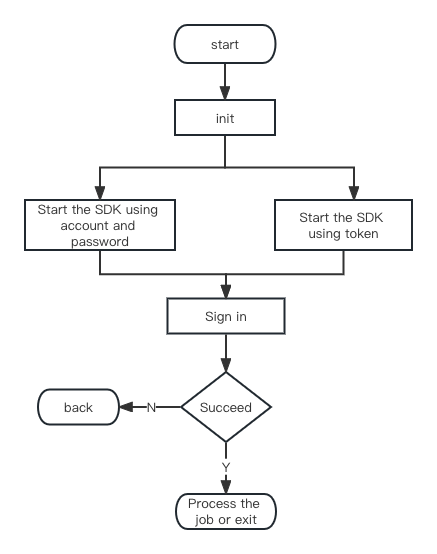
  • Consist of two login modules: external login with synchronized token and regular login with username and password.
  • Support basic functions such as ticket query, operation, and creation.
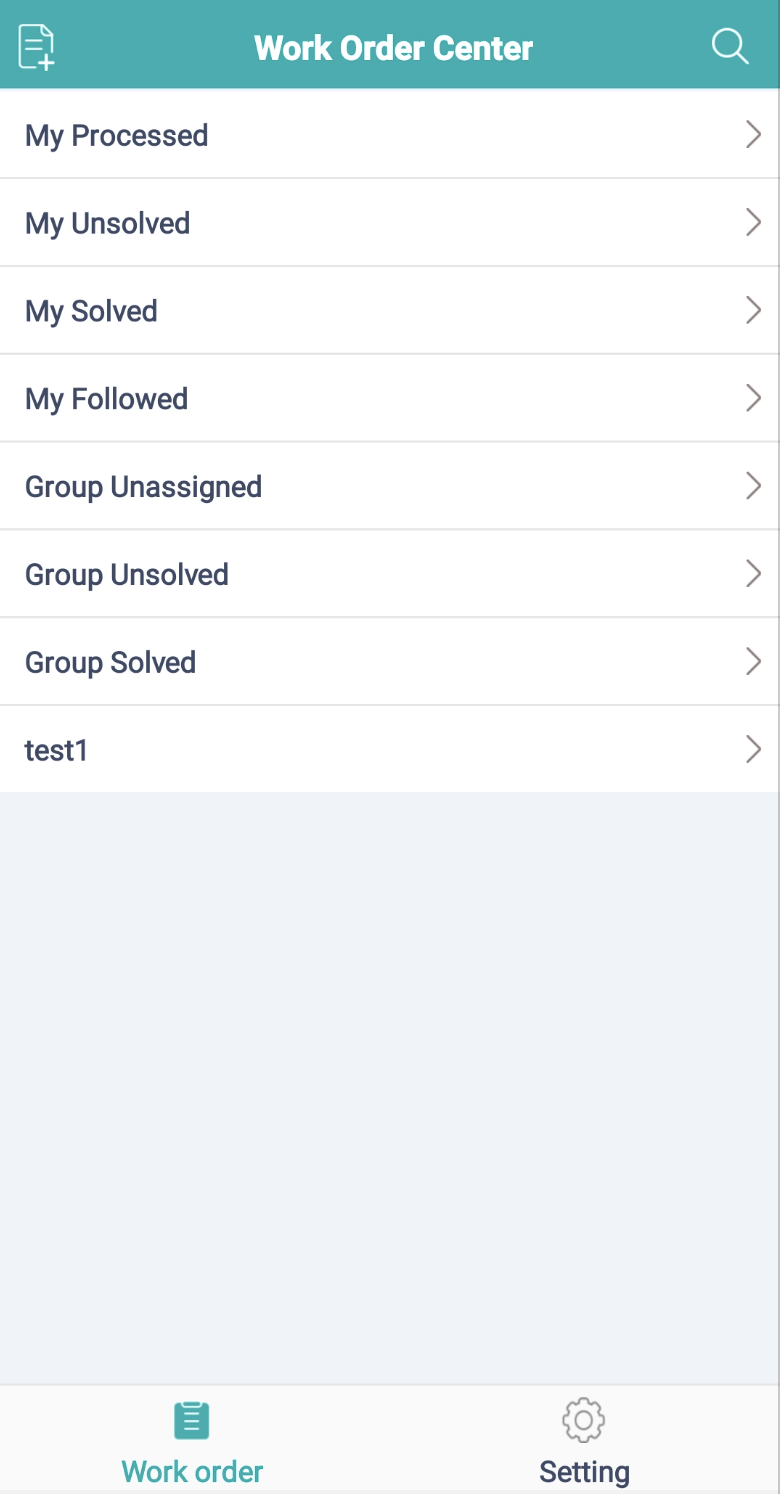
Image Related limits and notes :
  1. iOS SDK new version supports versions above iOS9, iPhone, and iPad, and supports both portrait mode and landscape mode.
  2. iOS currently only supports hyperlink tags and does not recognize other Html tags and attributes.
  3. iOS requires camera and photo permissions; otherwise, some functions are not available.

Schematic Diagram of Integration Process
Image
File Description
SDK files include (SobotOrder.framework, SobotCommon.framework and SobotOrder.bundle), SobotDemo, and Doc related documentation. | File| Description| |:----------|:----------|:----------|:----------| | SobotOrder.framework| Sobot ticket SDK code library| | SobotCommon.framework| Sobot code basic dependency library| | SobotOrder.bundle| SDK resource library, containing image files, multilingual files and colors| | SobotOrderApi.h| The file provides an access function| | SobotKitConfig.h| Basic UI configuration param class| | SobotCacheEntity.h| Basic function param class (color, language, display mode, etc.)| | SobotOrderHomeController| Ticket entry interface| | SobotOrderClient.h| Basic function|

Integration Method

Manual Integration
Download link: iOS_OrderSDK Unzip [iOS_SDK] and add necessary files SobotOrder.framework, SobotCommon.framework and SobotOrder.bundle to your project.
CocoaPods Integration
Add in podfile:
// Use the latest version
pod 'SobotOrderSDK'

If you cannot find the latest version, run the following command to update the CocoaPods pod:
pod repo update --verbose
If you cannot update to the latest version, you can delete the index file and try again
rm ~/Library/Caches/CocoaPods/search_index.json

Delete pod cache:
Delete the pod file folder in the code,
pod cache clean SobotOrderSDK
and then pod install

Quick start

step1 Domain name description

  • If you use localized deployment, please use your deployed server domain name.
Sample code:

	SobotCacheEntity *config = [[SobotCacheEntity alloc] init];
	// Designate bundle name
    config.bundleName = @"SobotOrder"; 
    // Designate international file path in bundle
    config.languageTableName = @"SobotLocal";     
    // Designate international file name
    config.languagePathInBundle = @"Localizable"; 
    // Designate color file name in bundle
    config.colorTableName = @"SobotColor";
    // Designate language
    config.absoluetelanguage = @"zh-Hans";
    [SobotOrderApi initWithHost:@"" config:config kitInfo:kitInfo result:^(NSInteger code, id  _Nullable obj, NSString * _Nullable msg) {

    }];


step2 Initialization param and call method

Initialization param and call method: Initialize information SobotCacheEntity; set the function related attributes; the initialization method is executed locally, with no asynchronous requests generated, and it takes effect immediately after setting. The main call code is as follows: [Note: Before initiating Sobot ticket SDK, call the initialization API initWithHost; otherwise, the SDK cannot be initiated] The method is as follows:


/// Initialization configuration
/// @param host Domain name
/// @param config  SobotCacheEntity configuration class
/// @param kitInfo SobotKitConfig configuration class
/// @param resultBlock Initialization callback (NSInteger code,id _Nullable obj,NSString *_Nullable msg);
+(void)initWithHost:(NSString *)host config:(SobotCacheEntity *)config  kitInfo:(SobotKitConfig *)kitInfo result:(SobotResultBlock) resultBlock;


Param:
ParamTypeRequiredDescription
configNSObjectYesBasic software configuration, operating normally only after being designated
hostNSStringNoIt’s Alibaba Cloud domain name by default. If you want to use other domain names, you need to designate it.
kitInfoNSObjectYesUI related configuration
resultBlockBlockNoInitialization status callback, code=1: succeed
Sample code:

SobotCacheEntity *config = [[SobotCacheEntity alloc] init];
	// Designate bundle name
    config.bundleName = @"SobotOrder"; 
    // Designate international file path in bundle
    config.languageTableName = @"SobotLocal";     
    // Designate international file name
    config.languagePathInBundle = @"Localizable"; 
    // Designate color file name in bundle
    config.colorTableName = @"SobotColor";
    // Designate language
    config.absoluetelanguage = @"zh-Hans";
    [SobotOrderApi initWithHost:@"" config:config kitInfo:kitInfo result:^(NSInteger code, id  _Nullable obj, NSString * _Nullable msg) {

    }];

step3 Initiate Ticket Homepage


/// Initiate SDK and enter the ticket SDK homepage
/// @param account Account
/// @param loginPwd Password
/// @param vc Initiate VC
/// @param resultBlock Callback result
+(void)startWithAcount:(NSString *)account password:(NSString *)loginPwd viewController:(UIViewController *)vc result:(SobotResultBlock) resultBlock;

/// Initiate SDK and use token
/// @param token token
/// @param account Account
/// @param vc Password
/// @param resultBlock Callback result
+(void)startWithToken:(NSString *)token loginUser:(NSString *) account viewController:(UIViewController *)vc  result:(SobotResultBlock) resultBlock;
    
    
Param
ParamTypeRequiredDescription
accountNSStringYesAgent account
loginPwdNSStringYesAgent account password
vcUIViewControllerYesVC for executing jump
resultBlockBlockNoExecution result, code=1: succeed
Sample code:

[SobotOrderApi startWithAcount:loginAccount password:password viewController:self result:^(NSInteger code, id  _Nullable obj, NSString * _Nullable msg) {
}];

Function Description

Permission Setting

Permissions to be added
<key>NSCameraUsageDescription</key>
  &lt;String&gt;Your camera will be accessed to send photos</string>
<key>NSPhotoLibraryUsageDescription</key>
  &lt;String&gt;Your photos will be accessed to send photos</string>

Initiate Sobot Page

1. Initiate Ticket Homepage
Method 1 : Directly use the method we provide to automatically log in and jump to the page. The method is as follows:


/// Initiate SDK and enter the ticket SDK homepage
/// @param account Account
/// @param loginPwd Password
/// @param vc Initiate VC
/// @param resultBlock Callback result
+(void)startWithAcount:(NSString *)account password:(NSString *)loginPwd viewController:(UIViewController *)vc result:(SobotResultBlock) resultBlock;

/// Initiate SDK and use token
/// @param token token
/// @param account Account
/// @param vc Password
/// @param resultBlock Callback result
+(void)startWithToken:(NSString *)token loginUser:(NSString *) account viewController:(UIViewController *)vc  result:(SobotResultBlock) resultBlock;
    
    
Param
ParamTypeRequiredDescription
accountNSStringYesAgent account
loginPwdNSStringYesAgent account password
vcUIViewControllerYesVC for executing jump
resultBlockBlockNoExecution result, code=1: succeed
Sample code:

[SobotOrderApi startWithAcount:loginAccount password:password viewController:self result:^(NSInteger code, id  _Nullable obj, NSString * _Nullable msg) {
}];

Method 2: Directly create SobotOrderHomeController, manually log in and jump to the page. You need to log in first and then perform jump operation. The method is as follows:


/// Login
/// @param account Account
/// @param loginPwd Password
/// @param resultBlock Callback result
+(void)loginUser:(NSString *)account password:(NSString * )loginPwd result:(SobotResultBlock) resultBlock;


/// Login (with token)
/// @param account Account
/// @param loginPwd Password, not required. If it is provided, when token is null, account and password will be used for login
/// @param token token
/// @param resultBlock Callback result
+(void)loginUser:(NSString *)account password:(NSString * )loginPwd  token:(NSString *) token  result:(SobotResultBlock) resultBlock;

Param
ParamTypeRequiredDescription
accountNSStringYesAgent account
loginPwdNSStringNoAgent account password, used only when token is null
tokenNSStringNoLogged-in token, not required when there is a password
vcUIViewControllerYesVC for executing jump
resultBlockBlockNoExecution result, code=1: succeed
Example:


[SobotOrderApi loginUser:fieldUserName.text password:fieldPassword.text token:fieldToken.text result:^(NSInteger code, id  _Nullable obj, NSString * _Nullable msg) {
    if(code == 1){
		// Create VC directly and use at your own discretion
		SobotOrderHomeController *orderHomeVC = [[SobotOrderHomeController alloc]init];
    }
}];

2. Initiate Ticket Details
[Note: Before performing the operation, you need to ensure that you have logged in] The method is as follows:

/// Open the Ticket Details page
/// @param vc Initiate VC
/// @param ticketId Ticket ID
/// @param resultBlock Callback result
+(void)startOrderDetail:(UIViewController *) vc orderId:(NSString *) ticketId formPage:(int)fromPage result:(SobotResultBlock) resultBlock;

Param
ParamTypeRequiredDescription
ticketIdNSStringYesTicket ID
vcUIViewControllerYesVC for executing jump
resultBlockBlockNoExecution result, code=1: succeed. Automatically jump after success
Sample code:

[SobotOrderApi startOrderDetail:self orderId:fieldOrderId.text result:^(NSInteger code, id  _Nullable obj, NSString * _Nullable msg) {
}];
        
3. Initiate the Create Ticket Page
[Note: Before performing the operation, you need to ensure that you have logged in.] The method is as follows:

/// // Enter the Create Ticket page Create tickets and exit after submission
/// @param vc Initiate VC
/// @param params Input parameters @{@"uname':@"Pass in the nickname of agent creating the ticket",@"userId":@"Pass in the ID of agent creating the ticket"}
/// @param resultBlock Callback result
+(void)startCreateOrder:(UIViewController *)vc params:(NSDictionary * _Nullable)params result:(SobotResultBlock) resultBlock;


Param
ParamTypeRequiredDescription
paramsNSDictionaryNoCustomer info, not required. When it is designated, the Create Ticket page does not need to select the corresponding customer.
vcUIViewControllerYesVC for executing jump
resultBlockBlockNoExecution result, code=1: succeed. Automatically jump after success

 NSDictionary *params = nil;
        if(fieldUserName.text.length > 0 && fieldUserId.text.length > 0){
            params = @{@"uname":sobotConvertToString(fieldUserName.text),@"userId":sobotConvertToString(fieldUserId.text)};
        }
        if(fieldOrderId.text == 0){
            return;
        }
        [SobotOrderApi startCreateOrder:self params:params result:^(NSInteger code, id  _Nullable obj, NSString * _Nullable msg) {
            
        }];
    

Login


/// Login
/// @param account Account
/// @param loginPwd Password
/// @param resultBlock Callback result
+(void)loginUser:(NSString *)account password:(NSString * )loginPwd result:(SobotResultBlock) resultBlock;

/// Login (with token)
/// @param account Account
/// @param loginPwd Password, not required. When token is null, password will be used for login
/// @param token token
/// @param resultBlock Callback result
+(void)loginUser:(NSString *)account password:(NSString * )loginPwd  token:(NSString *) token  result:(SobotResultBlock) resultBlock;

Logout


/// Exit SDK
/// @param resultBlock Callback result
+(void)outSobotUser:(SobotResultBlock) resultBlock;

Set Debug Mode


/// Set whether it is debug mode, with NO by default and logs not displayed
/// @param isShowDebug  YES or NO
+(void)setShowDebug:(BOOL) isShowDebug;

Configuration Class Attribute Description

● SobotKitConfig Class Description
The configuration takes effect immediately. Configure with the following functions in SobotOrderApi.h, and overwrite the previous set value after the initialization and direct configuration;
ParamTypeRequiredDescription
isShowExitAlterViewBOOLNoWhether to show the logout pop-up when login fails. NO (not enable) by default.
Setting method:
/// Change kitConfig configuration
/// @param kitConfig  congfig configuration
+(void)configKitInfo:(SobotKitConfig *) kitConfig;

/// Initialization configuration
/// @param host Domain name
/// @param config  SobotCacheEntity configuration class
/// @param kitInfo SobotKitConfig configuration class
/// @param resultBlock Initialization callback (NSInteger code,id _Nullable obj,NSString *_Nullable msg);
+(void)initWithHost:(NSString *)host config:(SobotCacheEntity *)config  kitInfo:(SobotKitConfig *)kitInfo result:(SobotResultBlock) resultBlock;

● SobotCacheEntity Class Description
This attribute must be configured at initialization, and can be configured once without repeating the configuration.
ParamTypeRequiredDescription
themeModeNSIntegerNoDisplay mode. 0: Follow the system, 1: Dark, 2: Light.
bundleNameNSStringNoResource name, SobotOrder by default.
languagePathInBundleNSStringNoInternational file path in bundle, with a fixed value of Localizable.
languageTableNameNSStringNoInternational file name in bundle, with a fixed value of SobotLocal.
colorTableNameNSStringNoColor file name in bundle, with a fixed value of SobotColor.
absoluetelanguageNSStringNoDesignated language, following the system by default.

Source Code and Demo

Sobot SDK Function DemoDownload

Update Description

SDK Version Update Description —>

Description of Sobot SDK’s Collection and Use of Personal Information

Description of Sobot SDK’s Collection and Use of Personal Information