
Call Capability (iOS-SDK)
Zhi Chi Customer Service provides enterprises with a complete set of intelligent customer service solutions. The Zhi Chi Call SDK supports all call-related functions. By simply providing the account to be used, tasks such as making calls, outbound calls, call monitoring, and call recording can be completed. The Wisdom Tooth Call SDK has the following features:- Provide the complete process of login - use - logout.
- There are 2 types of login modules: external login with token synchronization and regular login with username and password.
- Supports basic functions such as call phone registration, call record inquiry, call monitoring, and agent status switching.
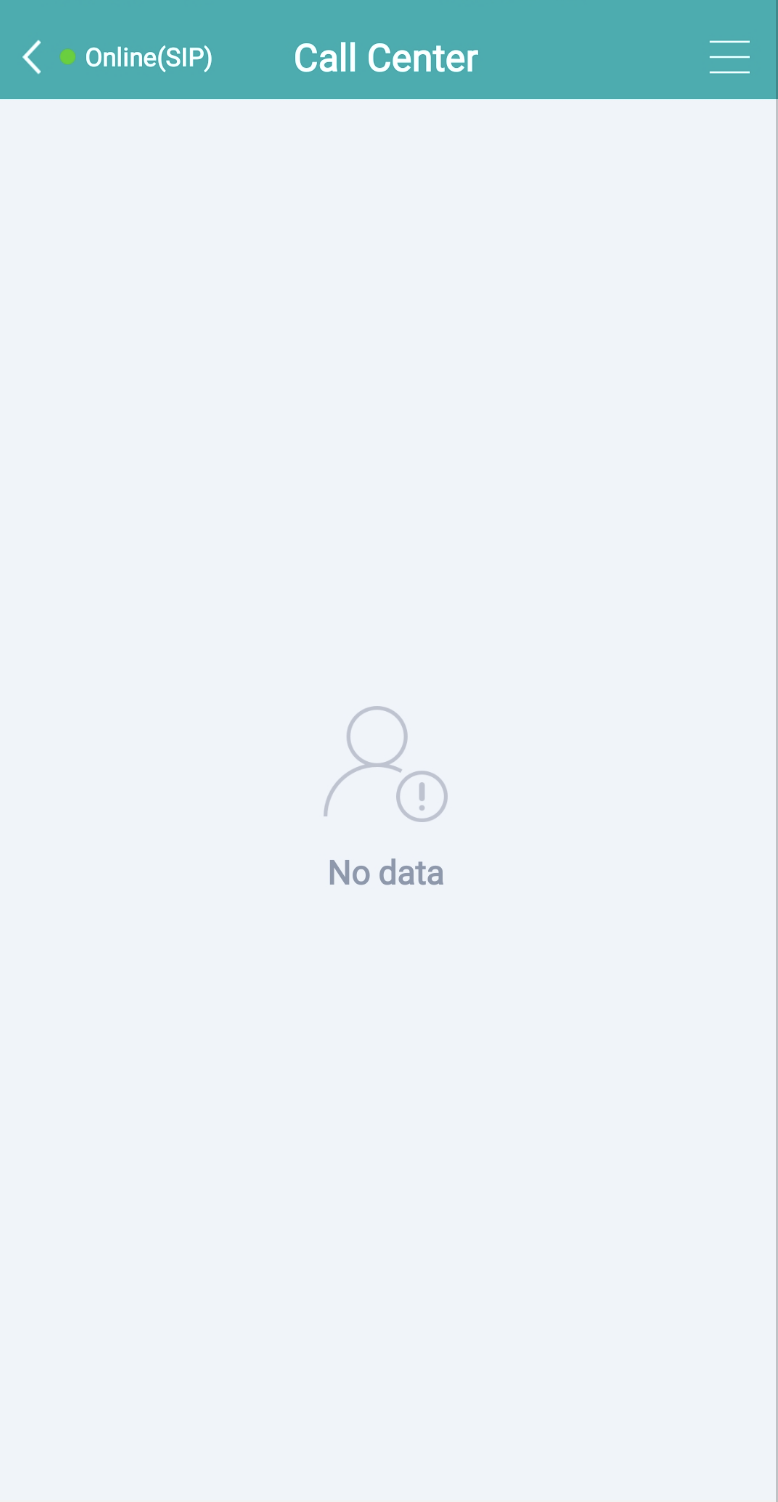 Relevant restrictions and precautions:
- The new version of the iOS SDK supports iOS 11 and above, and is compatible with both iPhone and iPad, supporting both portrait and landscape modes.
- IOS requires microphone permission; otherwise, the call function cannot be used.
- The SDK cannot be used at the same time as the call function in the Zhichi Customer Service APP and the call function in the Zhichi PC workstation.
Process Description
Integration Process Diagram
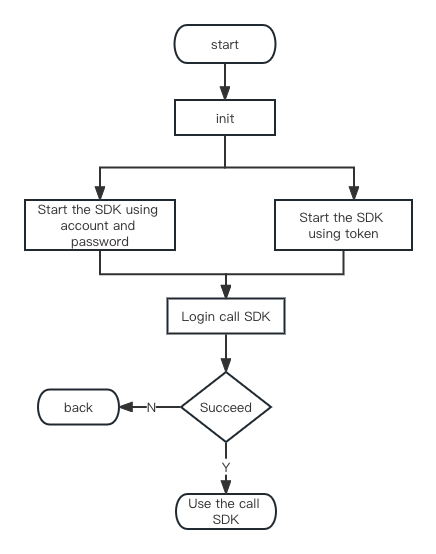
- SDK File Description The SDK includes (SobotCall.framework, SobotCommon.framework, SobotCall.bundle, and SobotCommon.bundle), SobotCallDemo, and Doc-related documentation.
Integration Method
Manual Integration
Download link: iOS_CallSDK Unzip [iOS_SDK], and add the necessary files SobotCall.framework, SobotCommon.framework, SobotCommon.bundle, and SobotCall.bundle to your project.
CocoaPods Integration
Add the following to the podfile:Quick Start
Step 1 Initialization
Initialization parameters and calling method: Initialize information SobotCallCacheEntity to set function-related attributes; The initialization method runs locally without asynchronous requests, and takes effect immediately after setting. The main calling code is as follows: [Note: Before starting the ZhiChi Call SDK, you must call the initialization interface initWithConfig. Otherwise, the SDK will fail to start.] Method:
Example code:
Step 2 Start the ZhiChi Page
Method 1: Use the method we provide to automatically complete login and redirect to the page. Method:
Example code:
Example:
Example:
Function Description
Open Interface Initialization
The first step in using the open API is to set the initialization configuration.
Example:
Request Parameters
See the description of SobotCallCacheEntity for details.Callback Function
See the description of SobotCallResultBlock for more details.Login Operation
Login
- The return values of this interface will continue to add attributes. Please use the correct compatibility coding method to ensure that the calling code does not throw errors when return value attributes are added.
Example:
Request Parameters
Callback Function
For details, see the SobotCallResultBlock description.Check In
- The return values of this interface will continue to add attributes. Please use the correct compatible coding method to ensure that the calling code does not throw errors when return value attributes are added!
- The system gets the latest agent ID in this interface. If you change the ID, the new ID will take effect after you sign in again.
- Calling the sign-in interface from one end will disconnect other ends (not offline agents);
- Supports the login status of the agent server = offline, online, and all other statuses for check-in. But when the agent server’s working status = in a call, ringing, in conversation, on hold, or in wrap-up, check-in is not allowed.
Example:
Request Parameters
Return Value of Success Callback Function
Skill Group Information QueueAgentCheckin
Callback Function
For details, see the SobotCallResultBlock description.Check Out
- The return values of this interface will keep adding attributes. Please use the correct compatible coding method to ensure that the calling code will not throw errors when return value attributes are added!
- The agent’s working status must be “Ready”, “Busy”, or “Locked”. Otherwise, it is not allowed.
Example:
Callback Function
For details, see the description of SobotCallResultBlock.Busy Status
- The return values of this interface will keep adding attributes. Please use the correct compatible coding method to ensure that the calling code does not throw errors when return value attributes are added!
Example:
Request Parameters
Callback Function
For details, see the SobotCallResultBlock description.Idle Settings
- The return values of this interface will continue to add attributes. Please use the correct compatible coding method to ensure that the calling code does not throw errors when return value attributes are added!
Example:
Callback Function
See the description of SobotCallResultBlock for more details.Query Agent Check-in Information
- The return values of this interface will keep adding attributes. Please use the correct compatible coding method to ensure that the calling code does not throw errors when return value attributes are added!
- Call this interface after logging in successfully.
Example:
Return Value
Callback Function
See the description of SobotCallResultBlock for more details.Query Available Answering Methods for Agent Seats
- The return values of this interface will continue to add attributes. Please use the correct compatibility coding method to ensure that the calling code does not throw errors when return value attributes are added!
- Call this interface after logging in successfully.
Example:
Return Value
Callback Function
For details, see the SobotCallResultBlock description.Query Available Extension Numbers for Agent Seats
- The return values of this interface will keep adding attributes. Please use the correct compatibility method to code, ensuring that when return value attributes are added, the calling end’s code will not throw errors!
- Call this interface after logging in successfully.
Example:
Return Value
Ext Description
Callback Function
See the description of SobotCallResultBlock for details.Query the login status of the agent
- The return values of this interface will keep adding attributes. Please use the correct compatibility coding method to ensure that the calling code does not throw errors when return value attributes are added!
- Call this interface after logging in successfully.
Example:
Callback Function
See the description of SobotCallResultBlock for details.Query Available Busy Reasons for Agent
- The return values of this interface will continue to add attributes. Please use the correct compatibility coding method to ensure that the calling code does not throw errors when return value attributes are added!
Example:
Return Value
AgentBusyStatus
Callback Function
For details, see the SobotCallResultBlock description.Query Skill Groups Available for Agent Login
- The return values of this interface will continue to add attributes. Please use the correct compatibility coding method to ensure that the calling code does not throw errors when return value attributes are added!
Example:
Return Value
Callback Function
For details, see the SobotCallResultBlock description.Reset Offline (Log Out)
- The return values of this interface will continue to add attributes. Please use the correct compatibility coding method to ensure that the calling code does not throw errors when return value attributes are added!
Example:
Callback Function
For details, see the SobotCallResultBlock description.Call Operation
Outbound Calls
- The return values of this interface will keep adding attributes. Please use the correct compatibility coding method to ensure that the calling code does not throw errors when return value attributes are added!
Example:
Request Parameters
Callback Function
For details, see the SobotCallResultBlock description.Answer the Call
- The return values of this interface will keep adding attributes. Please use the correct compatible coding method to ensure that the calling code will not throw errors when return value attributes are added!
Example:
Callback Function
For details, see the SobotCallResultBlock description.Hang Up
- The return values of this interface will keep adding attributes. Please use the correct compatible coding method to ensure that the calling-end code will not throw errors when return value attributes are added!
Example:
Callback Function
See the description of SobotCallResultBlock for details.Keep
- The return values of this interface will keep adding attributes. Please use the correct compatible coding method to ensure that the calling code will not throw errors when return value attributes are added!
- Temporarily suspend the call between the agent and the customer. After holding, the customer will hear hold music, and the agent side will be muted.
- This operation supports 3 answering methods: SIP phone, web page, and mobile phone.
Example:
Callback Function
For details, see the description of SobotCallResultBlock.Cancel Hold
- The return values of this interface will continue to add attributes. Please use the correct compatibility coding method to ensure that the calling code does not throw errors when return value attributes are added!
- Restore the suspended call between the agent and the customer. After canceling the hold, the customer and agent resume normal conversation.
Example:
Callback Function
See the SobotCallResultBlock description for more details.Mute
- The return values of this interface will continue to add attributes. Please use the correct compatible coding method to ensure that the calling code will not throw errors when return value attributes are added!
- Turn off the microphone of the operation seat so that others cannot hear the sound from this seat. For example: Agent A consults Agent B, and both Agent A and Agent B can mute their own microphones.
- The listener does not support this operation (the listener’s microphone is always off during monitoring).
- This operation supports 3 answering methods: SIP phone, web page, and mobile phone.
Example:
Callback Function
See the SobotCallResultBlock description for details.Unmute
- The return values of this interface will continue to add attributes. Please use the correct compatible coding method to ensure that the calling code does not throw errors when return value attributes are added!
- Restore the microphone on the agent side so that others and the agent can resume normal calls.
Example:
Callback Function
For details, see the description of SobotCallResultBlock.Query Sound Playback Type
Switch between the earpiece and speaker repeatedly.Example:
Return Value
Set Sound Playback Type
Switch between the earpiece and speaker.Example:
Return Value
Callback Function
For details, see the SobotCallResultBlock description.Send Satisfaction
- The return values of this interface will keep adding attributes. Please use the correct compatible coding method to ensure that the calling code won’t throw errors when return value attributes are added!
- After the agent sends the satisfaction survey, the system disconnects all agent-side calls (including monitoring, three-way calls, etc.), keeps the customer-side call active, and plays the satisfaction evaluation message; at the same time, it hangs up all agent-side calls.
Example:
Callback Function
See the description of SobotCallResultBlock for details.Extend the Tidying Duration
- The return values of this interface will keep adding attributes. Please use the correct compatible coding method to ensure that the calling code won’t throw errors when new attributes are added to the return values!
- When the agent’s phone status is in wrap-up, you can extend the wrap-up duration; 30-900 seconds.
Example:
Request Parameters
Callback Function
For details, see the description of SobotCallResultBlock.End of Organization
- The return values of this interface will keep adding attributes. Please use the correct compatible coding method to ensure that the calling code will not throw errors when return value attributes are added!
- When the agent’s phone status is in wrap-up, you can end the wrap-up status early.
Example:
Callback Function
For details, see the SobotCallResultBlock description.Finish organizing and set to busy
- The return values of this interface will continue to add attributes. Please use the correct compatible coding method to ensure that the calling code will not throw errors when return value attributes are added!
- When the agent’s phone status is in the “organizing” state, you can end the organizing state early and enter the “do not disturb” state.
Example:
Return Value of Callback Function
For details, see the SobotCallResultBlock description.Send Button
- The return values of this interface will continue to add attributes. Please use the correct compatible coding method to ensure that the calling code does not throw errors when return value attributes are added!
Example:
Request Parameters
Callback Function Return Value
For details, see the description of SobotCallResultBlock.Auxiliary Operations
Query the outbound routing rules for seats
- The return values of this interface will keep adding attributes. Please use the correct compatible coding method to ensure that the calling code will not throw errors when return value attributes are added!
- After the agent signs in, they can check the outbound routing rules set in the “Outbound Routing” for agents.
Example
Return Value of Callback Function
See the description of SobotCallResultBlock for more details.Return Value obj Description
Table 1 explicitRule Description of the explicit rule array
Table 2 explicitSchema Dynamic Externally Visible Plan Array Description
Table 3 explicitNumbers Description of the explicit number array
Modify the Outbound Routing Rules for Seats
- The return values of this interface will keep adding attributes. Please use the correct compatible coding method to ensure that the calling code will not throw errors when return value attributes are added!
- When the agent’s phone is idle, the system can switch to the last used outbound rule for that agent.
Example:
Request Parameters
Callback Function Return Value
See the SobotCallResultBlock description for details.Return Value
Table 1 explicitRule Description of the explicit rule array
Table 2 explicitSchema Dynamic External Schema Array Description
Table 3 explicitNumbers Description of the explicit number array
General Attribute Description
Unified Callback Interface SobotCallResultBlock
All interfaces uniformly use this rule to return results. The main thread has returned, and you can directly refresh the UI.
When the status is successful, please use the following listener to get the real-time status of the agent and call events:
Monitor agent statusEvent description reference Call Event (TS).
Listen to Call Events
Parameter Description
Domain Settings (Optional)
Domain Name Description:- The default SaaS platform domain name is: https://api.sobot.com.
- If you are a Tencent Cloud service, please set it to: https://www.soboten.com.
- If you are using a local deployment, please use your own service domain name.
SobotCallParameter Class Description
The configuration takes effect immediately. Use the following function in SobotCallApi.h to configure. After initialization and direct configuration, the new setting will override the previous one.
Setting method: