> ## Documentation Index
> Fetch the complete documentation index at: https://docs.sobot.io/llms.txt
> Use this file to discover all available pages before exploring further.
# Agent Component SDK
## iOS Customer Service SDK Integration Instructions
The ZhiChi Customer Service SDK provides the ability for APPs to access customer service reception. By simply embedding it, you can monitor and handle customer inquiries in real time. It enables online customer reception on mobile devices without downloading the ZhiChi APP.
Online Customer Service SDK has the following features:
* Online consultation: Customer service and users chat in real time. They can send and receive messages such as pictures, videos, and emojis.
* Focus on users, provide smart replies, quick replies, session summaries, and invite users to leave feedback.
* Highly customizable UI.
Relevant Restrictions and Precautions:
1. The new version of the iOS SDK supports iOS 11 and above.
2. IOS currently only supports hyperlinks. It does not recognize other HTML tags and attributes.
3. IOS requires permission for the microphone, camera, and photo library. Otherwise, some features will not work.
### Process Description
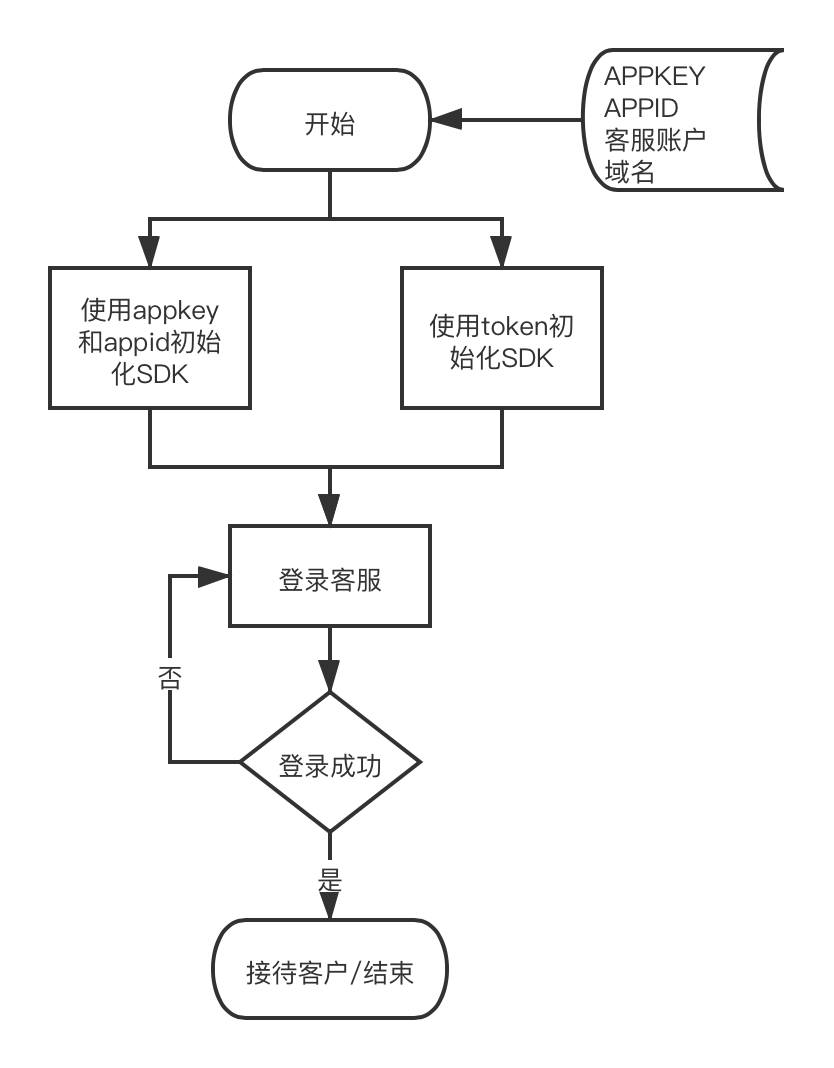
#### Integration Process Diagram
#### File Description
**The SDK includes (SobotOnline.framework and SobotOnline.bundle), SobotDemo, and Doc-related documentation.**
| File | Description |
| :-------------------- | :--------------------------------------------------------------------- |
| SobotOnline.framework | ZhiChi SDK Code Library |
| SobotOnline.bundle | SDK resource library, contains image files, multilingual files, colors |
| SobotOnlineService.h | Key Function Operation Class |
| SobotOnlineConfig.h | Function configuration class |
| SobotCache.h | Basic framework settings class |
#### Permission Description
Permissions required to use the online customer service SDK:
```js theme={null}
NSCameraUsageDescription
Sending images requires access to the camera
NSMicrophoneUsageDescription
Sending voice requires access to the microphone
NSPhotoLibraryUsageDescription
Sending pictures requires access to the album
```
## Integration Method
### Manual Integration
Download link:
Download and unzip [iOS\_OnlineSDK](https://img.sobot.com/mobile/sdk/iOS_OnlineSDK_v1.0.2.zip), then add the necessary files SobotOnline.framework and SobotOnline.bundle to your project.
### CocoaPods Integration
Integrate the code by adding it to the podfile:
```js theme={null}
pod 'SobotOnlineSDK'
```
If the library cannot be found, clear the pod cache:
```js theme={null}
// Cannot find the latest version
pod cache clean --all
rm -rf ~/Library/Caches/CocoaPods
pod repo update
Delete the pod folder in the code,
Pod cache clean plugin name
Run pod install again
```
## Quick Start
### Step 1 Domain Settings
\[Note: To obtain appid and app\_key, please contact the Zhichi after-sales team; if you use the token method to access, refer to the API documentation [Get token](https://www.zhichi.com/developerdocs/service/knowledge_base.html#_2、Interface_call).]
Domain Name Description:
\* The default SaaS platform domain is: [https://api.sobot.com](https://api.sobot.com).
\* If you are a Tencent Cloud service, set it to: [https://ten.sobot.com](https://ten.sobot.com).
\* If you are using a localized deployment, please use your own service domain name.
### Step 2 Initialize SDK
Method 1: Initialize the SDK using appid and appkey.
Example code:
```
/// Initialize the SDK, set the domain name, and get the token
/// @param appid Company appid
/// @param appkey Merchant appkey
/// @param host Can be empty, default is Alibaba Cloud service; if needed, set your own domain name
+(void)initWithAppid:(NSString *) appid appkey:(NSString *) appkey host:(NSString * __nullable) host result:(void (^)(id object))resultBlock;
// lg:
[SobotOnlineService initWithAppid:@"your appid" appkey:@"your appkey" host:@"https://test.sobot.com" result:^(id _Nonnull object) {
}];
```
Method 2: Directly initialize the SDK using a token.
```
/// Initialize the SDK, set the domain name and authentication token
/// @param token Authentication token
/// @param host Can be empty, default is Alibaba Cloud service; if needed, set your own domain name
/// @param resultBlock Return result
+(void)initWithToken:(NSString *) token host:(NSString * __nullable) host result:(void (^)(id object))resultBlock;
```
### Step 3 Launch Page
For details, see the Demo call code. The main call code is as follows:
\[Note: Before launching the page, you must call the initialization interface initWithAppid. Otherwise, it cannot be started.]
Interface:
```js theme={null}
/// Launch customer service authentication page
/// @param account Customer service account (email)
/// @param loginStatus Login status 2:Busy, 1:Online, 0:Default
/// @param byController The controller that starts
+(void)startAuthWithAcount:(NSString *) account status:(int) loginStatus vc:(UIViewController *) byController result:(void (^)(id object))resultBlock;
```
Parameter:
| Parameter | Type | Required | Description |
| :---------- | :------- | :------- | :---------------------------------- |
| account | NSString | Yes | Customer service email |
| status | int | Yes | -1. Not sticky, 0. Busy, 1. Online. |
| resultBlock | Block | No | Callback for startup result status |
Example code:
```js theme={null}
#import
[SobotOnlineService startAuthWithAcount:@"zhangxy@sobot.com" status:1 vc:self result:^(id _Nonnull object) {
}];
```
## Function Description
### 1. Resource Allocation
Optional. The default value is as follows. You can customize the resource library.
```
// Specify the name of the bundle to load, default is SobotOnline
[SobotCache shareSobotCache].sobotCacheEntity.bundleName = @"SobotOnline";
//Specify the name of the color file to load, default is SobotColor
[SobotCache shareSobotCache].sobotCacheEntity.colorTableName = @"SobotColor";
```
### 2. Log in
Silent online customer service, after login, if the customer service is online, can receive real-time message monitoring.
```js theme={null}
#import
/// Only log in to the customer service account, without executing page logic
/// @param account Customer service account (email)
/// @param loginStatus Login status 2:Busy, 1:Online, 0:Use default value
/// @param resultBlock Login result
[SobotOnlineService doLoginWithAccount:@"zhangxy@sobot.com" status:1 result:^(id _Nonnull object) {
}];
```
### 3. Log Out
Take the current customer service offline.
```js theme={null}
#import
/// Manual Offline Customer Service
[SobotOnlineService outAdmin];
```
### 4. Get Unread Messages
Get the total number of current unread messages. Local messages will be cleared after re-login.
```js theme={null}
#import
/// Get the number of unread messages
int num = [SobotOnlineService getUnReadNumber];
```
### 5. Set Up Message Listening
You can choose either the proxy method or the block method to listen.
```js theme={null}
#import
// In block mode
[SobotOnlineService setReceiveMessageBlock:^(id message, int nleft, NSDictionary *object) {
}];
// Set proxy method
[SobotOnlineService setReceiveMessageDelegate:self];
// Set the message link click listener; return YES to handle it yourself, no further internal processing will be done.
[SobotOnlineService setSobotLinkBlock:^BOOL(id object, NSString *linkUrl) {
If([linkUrl isEqual:@"I like it"]){
// do something
return YES;
}
return NO;
}];
```
### 6. Function Configuration
Configure some features in attribute mode, such as configuring color and feature development. Not yet in use.
For example (whether to automatically remind):
```js theme={null}
SobotOnlineConfig *config = [SobotOnlineService getCurOnlincConfig];
config.autoNotifaction = YES;
[SobotOnlineService configSobotOnline:config];
```
## Source Code and Demo
[Click to download Demo source code](https://img.sobot.com/mobile/sdk/iOS_OnlineSDK_v1.0.2.zip);
[Click to view Demo usage tutorial](https://img.sobot.com/mobile/onlinesdk/kefusdkdemo.mp4)
## Update Notes
[SDK Update Notes](https://shimo.im/docs/m5kv92Kw8otXG0qX/)
## Privacy and Permissions
[《ZhiChi Technology SDK Personal Information Collection and Usage Statement》](https://www.zhichi.com/docs/clause/sdk-clause.html)